Anyone who has pitched a startup has heard some version of the question: is this a trillion-dollar market? The reasons for this question are sound. Software is expensive to build and expensive to keep running, so the only way to make the math work is to amortize that cost over millions of customers. Big markets justify big builds. Small markets don't get software at all, or they get whatever the big build happens to offer them.
But, a trillion dollars is also a billion times a thousand dollars. That arithmetic has always been true, but it hasn't mattered, because nobody could build software for a market worth a thousand dollars. I think that is changing. My thesis is that custom apps, built with AI's help, will fracture trillion-dollar markets into a billion, thousand-dollar markets. Over the coming weeks, I plan to show how that happens by building one.
Who Adapts to Whom
The trillion dollar model has a cost that doesn't show up on anyone's balance sheet. When a vendor builds one CRM for millions of businesses, it has to decide how a generic business works: what a customer is, what a deal is, which stages a sale moves through, what an invoice looks like. Those decisions are reasonable on average and wrong for almost everyone in particular. So the business adapts. It renames its own concepts to match the vendor's fields, reorders its work to match the vendor's workflow, and keeps a spreadsheet on the side for everything the tool can't express.
Most small organizations end up somewhere in between. They try the SaaS tool, find it fits badly, and fall back to spreadsheets, email templates, and a payment processor stitched together by whoever happens to know how it all works. That's roughly where IIW Foundation, the small nonprofit that runs the Internet Identity Workshop, is today. The work gets done, but the process lives in a few people's heads and in files that slowly drift out of agreement with each other. Neither option is good. One makes the organization fit the software; the other gives up on software doing much at all.
There's a reason SaaS won. Custom software used to mean hiring a developer to build it and then keeping that developer around forever, because the code rotted as soon as nobody tended it. A small organization couldn't afford the first part and certainly couldn't afford the second. Renting someone else's opinionated software was the rational choice. The question is whether the cost structure that made it rational still holds.
Markets of One
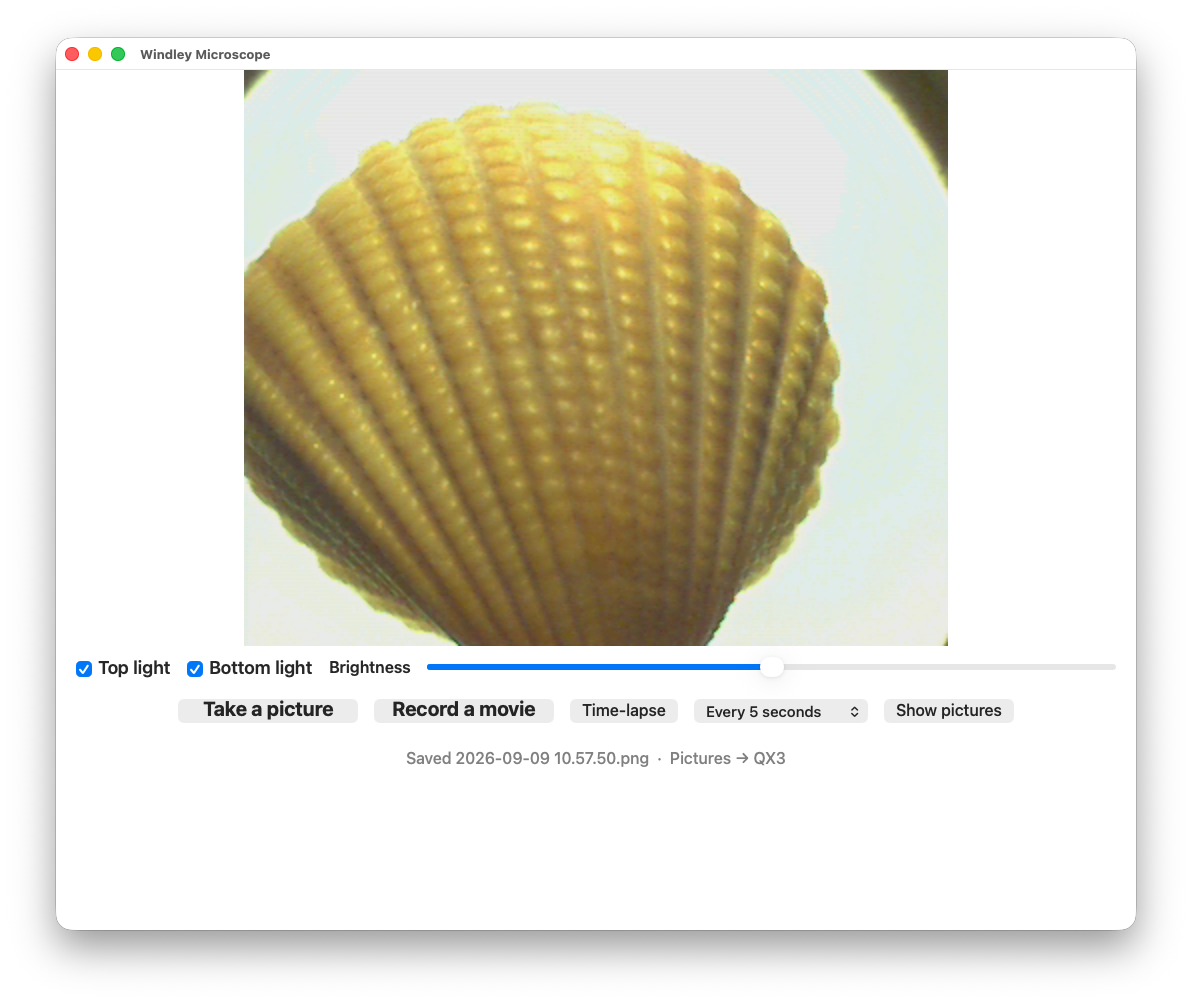
In There's a Personal App for That, I described reviving an old USB microscope by using Claude to build a Mac app for it in a morning. A few years ago that app would have taken me two weeks, and I wouldn't have bothered. The point of the post wasn't the microscope. It was that a whole backlog of software that never got written, because its audience was too small to justify the cost, has suddenly become approachable.
A small business is that kind of audience. It is a market of one, and the software it needs is worth something like a thousand dollars of effort to it, not a million. No vendor can serve that market profitably, but the business can now serve itself. With a coding agent doing much of the work, the build is no longer the obstacle; the obstacle is knowing your own process well enough to describe it. Every organization already has that knowledge. It's just been trapped in spreadsheets and habits because there was no affordable way to turn it into software.
So I'm building a CRM and invoicing system for IIW Foundation. It isn't a product and won't be sold. It's shaped entirely around how we find sponsors, talk to them, invoice them, and keep track of who has done what, using our words for things and following the steps in the order we actually take them. Where a commodity service does the job well, the system uses it: payments will still go through our payment processor, and the books will still live in our accounting software1. The rule I'm following is to rent the rails and own the process. The parts that are the same for everyone can stay rented; the parts that make the organization what it is should belong to it.
Somewhere for It to Live
Cheap code isn't enough on its own. Most of what makes a business application expensive isn't the business logic; it's the plumbing around it: a database and its schema, user accounts and authorization, background jobs, and integrations that break when someone else changes an API. An agent can write all of that, but someone still has to run it and keep it working. Each of those pieces is a separate component with its own versions, its own security patches, and its own way of breaking, and every one of them is a place for rot to start.
I learned this the hard way. I once helped a friend build a dashboard for a large screen in the order-packing operation of his warehouse. We got it running, and the next day he called to say it wasn't working. He had quit the terminal window the dashboard was running in, not realizing that doing so stopped the dashboard. Nothing in the code was broken. What broke was the unstated assumption that someone who knew how the software ran would always be around to run it, and that's an assumption custom software for a small organization can't make.
That's why I'm building this on picos and Manifold. Each organization we work with, each person, and each event becomes a pico: a small, always-on actor with its own identity, its own state, and its own rules. Picos keep their own state and channels with policy decide who can do what, so there's no separate database or authorization system to stand up. That doesn't make maintenance go away; the engine and Manifold still have to be kept current, and the integrations with outside services will still break from time to time. But instead of a stack of separate components to track, there's one platform to keep up, and the business logic lives in rulesets on top of it.
Manifold supplies the framework for a mesh of picos, giving the app a vocabulary of things and communities to build on rather than raw channels and relationships. As I wrote in Pico Engine 1.8 Is for Builders, the engine now describes itself well enough that an agent can extend a pico application, and also operate one. I expect to run most of the CRM by talking to it, with the agent drafting and proposing and a person confirming anything that touches money or leaves the building.
This app is also a test of the pico stack. Manifold was built for meshes of devices and things, and a CRM will find the places where it isn't as general as I think it is. Some of what the app needs, like serving web views from picos and talking to outside services with modern authorization, belongs in the engine or in Manifold rather than in the app. Building something real will help me find those gaps.
I'm also aware that "I built it myself" proves very little. The pico engine is mine, so of course I can build an app on it. The real test is whether the thousand-dollar market stays a thousand-dollar market after the first build. Can IIW Foundation keep adapting the system as our process changes, adding a rule here and a ruleset there, without depending on me?
That doesn't mean every business has to do the work itself. Plenty of small organizations will bring in a consultant to build the first version and come back from time to time to update it, the same way they already hire a bookkeeper or an accountant. The model still works because the business owns what the consultant builds: software that fits how the business works, not a seat in someone else's product. If a coding agent and someone who understands the business can make those changes in an afternoon, the economics hold. If not, this is just a hobby with an invoice attached.
I don't know yet which way that will come out, and I'd like to find out in the open. This is the first in a series of posts about building the system: the decisions we make, what picos and Manifold handle well, the gaps we find and close, and whether the result actually fits the way IIW Foundation works. If you're interested in custom software for small organizations, or in what picos can do outside the Internet of Things, you can follow along as we go.
Software That Fits
This is about more than convenience. How an organization works is part of what it is. The way a small nonprofit treats the people who support it, or the way a shop handles its regulars, is where much of its character lives. When that process gets flattened into a vendor's model of an average business, the organization loses some of its ability to be itself. It also hands its relationships, the record of who it knows and what they've done together, to a company whose interests are not its own.
In Identity Enables Autonomy, I argued that people need apps and data they control, and that those apps need to be able to move. The same holds for small organizations. A system built on picos lives in a mesh the organization owns, and it can move from one host to another without breaking. The data and the process belong to the business that created them, not to whoever rents it the software.
The trillion-dollar market will still be there, and some problems really do need software built once for everyone. But a lot of what we've been renting was never a good fit; it was just the only option we could afford. Every small business, nonprofit, club, and workshop could have software shaped to how it works instead of reshaping itself around someone else's assumptions. We can keep adapting ourselves to tools built for everyone, or we can start building tools that fit us. The choice is ours.
Notes
Accounting software is an interesting example of a big, one-size-fits-all market that will likely survive. Long before software took over the world, accountants had standardized their processes and terminology, so most businesses (or at least their accountants) already conform to a common framework that general-purpose accounting software can accommodate.
My session at Internet Identity Workshop (IIW) next week will show a pico moving from one engine to another. A bike club sells Gravel Bike #7 to a new owner, and the pico that represents the bike, along with the child pico for its bike computer, moves from the club's mesh to the new owner's mesh. Its identity comes along, and so do its relationships. I described the mechanics (with a video) in Moving Picos from Mesh to Mesh; here I want to explain why I think it matters.
It's easy to see a demo like this as a migration feature, the kind of thing an operations team uses to shuffle workloads between data centers. That is not my primary goal. My aim is loftier: portability is how people keep control of their online lives without having to run the infrastructure themselves, and identity is what makes portability work. In other words, identity enables autonomy.
Freedom Requires Portability
Personal freedom online requires that we control our apps and our data. I've been making some version of that argument for decades. For example, in The CompuServe of Things, I worried that the Internet of Things was being built as a collection of walled gardens, each with its own servers, accounts, and terms of service. If the company running the server decides your thermostat is no longer supported, the thermostat stops being yours in any meaningful sense. The same is true of the apps and data that run the rest of our lives.
The obvious answer is to run your own servers, but realistically, most people never will. That isn't a failure of will or education; it's the same reason most people don't generate their own electricity. Hosting is a service, and people should be able to buy it the way they buy other services, so long as they can freely move to another service. A renter doesn't own the apartment, but they own the furniture, and when they move, the furniture goes with them. Apps and data should be the same: hosted by someone, but not owned by them.
Spheres of Control
Every hosting arrangement comes down to a simple question: whose rules apply? In the physical world, we answer it without thinking. The things in your house are yours to use, lend, or rearrange; the things in a store belong to the store until you buy them, and the store sets the rules for handling them. Each of us has a sphere of control, the set of things we get to make decisions about, and we move through other people's spheres all day long without confusing them with our own.
Online, those boundaries are much harder to discern. An app on your phone feels like yours, but in most cases the app's logic and the data it collects live on someone else's servers and follow someone else's rules. You're a visitor in the provider's sphere of control, even when the subject is your own health, your car, or your bike. The important question isn't who hosts the app; it's whose sphere of control the app and its data belong to.
Figure 1 shows how most apps work today. The app and the data about you sit inside the provider's sphere of control, and you reach both through the provider. You use the app, but the provider decides what it does, what happens to your data, and how long either one exists.
Figure 1: The Provider's Sphere of Control (click to enlarge)
Figure 2 shows a better model. The app and the data sit inside your sphere of control, and the company that used to be the provider becomes a partner that works with your data on terms you set, labeled "my terms" in the figure. The components in the two figures are nearly identical. What changes is who's in charge.
Figure 2: Your Sphere of Control (click to enlarge)
I first imagined the arrangement in Figure 2 in the area of IoT, where every connected thing could have its own app under its owner's control rather than its manufacturer's. That was hard to realize when every app had to be built and maintained by someone with a business reason to do it. AI changes the calculation. As I wrote in There's a Personal App for That, building a custom app for a single person or organization is now a morning's work. When apps are that cheap to make, software stops looking like a few products with millions of users and starts looking like a billion small markets. Those apps need somewhere to live that the person controls, and they need to be able to move.
Identity Is the Foundation
Portability sounds like a storage problem: export the data and import it somewhere else. The hard part is everything that points at the thing you moved. A pico does its work through relationships with other picos, and if moving it breaks every relationship that refers to its old address, the pico hasn't really moved; it has been orphaned. Identity is what lets the rest of the world still recognize something that has moved.
That's why some of the recent pico engine work focused on pico-to-pico identity. Each pico carries two kinds of DIDs, and they do different jobs in a move. The did:webvh is the pico's public identity, the passport it hands to strangers. Its self-certifying identifier (SCID) survives a move; only the host and path change, and anyone who resolves the DID finds the pico at its new location.
Relationships ride on something else. Each relationship is based on a pair of did:peer identifiers, private, point-to-point names with no engine address baked into them. The picos use them to exchange messages using DIDComm. After a move, the pico sends a rotation message to each of its peers, and each peer updates where it sends traffic for that relationship. Nothing has to be reintroduced; the did:webvh keeps the pico findable, and the peer DIDs keep its relationships intact. In the demo, four things move together:
The subtree — the bike pico and its children export as a portable blob and import on the new engine. This isn't federation of whole engines; it's one subtree changing hands.
The identity — the SCID stays the same while the DID's host and path follow the engine.
The relationships — they're kept whole, even when that means converting a local ECI-based relationship into a DID-based one.
The app — the application and all its data move from one sphere of control to another.
The last item is the point the demo is trying to make. The new owner doesn't get a data export from the club's system; they get the bike's pico, with its functionality, history, and relationships, running in their own mesh.
Identity Enables Autonomy
A personal app needs more than code; it needs a place to keep its state, a way to talk with the people, devices, and services it works with, and an identity those parties can rely on. Picos package all of that together. The name itself is short for "persistent compute object" and that's been the goal for as long as picos have existed.
Each pico persists its own logic and data, responds to events from anywhere on the internet, and carries its relationships with it. Because the whole package travels as a unit, moving a personal app from one host to another becomes an operation rather than a rewrite. The host provides a place to run; the pico is the app.
Selling a bike is one reason to move a pico, but there are many others:
Resilience — leave a host that fails, turns hostile, or censors.
Economics — find cheaper compute or storage.
Latency — get closer to the people, devices, and other picos it works with.
Bandwidth — move toward the data instead of hauling it across the network.
Jurisdiction — live on infrastructure with the right governance and data-handling rules.
Ownership — follow a sale, or simply avoid lock-in.
Today, a person or a program acting for them decides when a pico moves. And does the exporting and importing by hand. What I ultimately want is for a pico to move itself on command and, eventually, on its own judgment, weighing cost, latency, reliability, and trust to decide where it should live. Getting there takes more work. Moves need to be atomic, with rollback when something fails halfway and forwarding from the old location; the engine needs to transfer exports and clean up the donor rather than leaving those jobs to the operator; and we need far more testing against relationships that cross subtree boundaries and external systems that remember old addresses. I expect the sharp edges to show up as soon as people use this for something other than my demo.
Picos are persistent objects with their own identities and relationships, not session tokens issued by whatever app happens to host them. That distinction is what makes everything else possible. An app whose identity belongs to its host can only live where it's told. A pico with its own identity can choose where it lives, just like the person it works for. Identity enables autonomy.
When I was in grad school, Smalltalk was all the rage. Commercial Smalltalk systems were expensive, so we didn't get much time with them, but the experience of sitting at the console and building something by interacting with a live system has always stuck with me. You didn't write a program and then run it. You worked inside a running world of objects, poked at them, changed them, and watched what happened.
In time, the software industry settled on the C model of edit, compile, and run because it offered reproducible, reasonably portable code on standard operating systems. Java arrived in the 1990s and stole the object-oriented limelight with a C-style syntax and a familiar build model. Smalltalk slowly faded into relative obscurity. Still, I never forgot the joy of working with a live system or the convenience of debugging from a console against a real image. So when we built the pico engine, Bruce Conrad built a developer UI that lets you see a pico mesh, send events and queries to any pico in it, and examine the results.
The pico engine developer UI showing a pico mesh (click to enlarge)
The latest release of the pico engine, version 1.8, doubles down on that idea and makes the developer experience better than it has ever been. And since developers now often include AI agents, we've made it better for them as well. An accompanying Manifold 1.8 release brings the Manifold rulesets along. This post describes the changes and why I think they matter beyond the developers who write KRL.
Smalltalk's Vision for Developers
A Smalltalk system wasn't a program you compiled. It was an image: a saved snapshot of a whole world of live objects, including the classes, the windows, the compiler, and the development tools themselves. You started the image and picked up where you left off, with every object still holding its state. Everything in that world was an object, and objects talked by sending messages. Alan Kay later said that calling it "object-oriented" was a mistake because the big idea was messaging; what mattered was what happened between objects, not what was inside them. That idea runs through actors and, eventually, to picos, as I described in Closures, Objects, Actors, and Picos.
The tools were where Smalltalk put developers first. Each was a live view into running objects:
Browser: every class and method in the system, including the system's own source, open for editing, with changes taking effect immediately.
Workspace: a scratch pad where you could select any expression and do it, print it, or inspect it against real objects before committing it to a method.
Inspector: open any object, see its instance variables, and change them in place.
Debugger: stop on an error with the live stack intact, fix the method right there, and resume.
Together these collapsed the edit, compile, run, and debug cycle into one continuous conversation with a running system. You didn't reproduce a bug; you were already standing in it. And Kay had a bigger goal than developer convenience. His Dynabook work at Xerox PARC imagined a world where children and other non-specialists would use Smalltalk to build their own tools. Users would be builders, not just consumers of software. Both of those ideas, the continuous conversation and users as builders, sit at the center of this release.
Changes to the Testing Tab
The Testing tab in the pico engine UI has always been the closest thing we had to a Smalltalk workspace. You pick a pico, choose an event or query, fill in some attributes, and send it. Until now, though, the forms came from a hidden __testing structure that the compiler guessed at exposing a cacophony of confusing choices in the Testing tab without much quidance.
The new 1.8 Testing tab (click to enlarge)
In 1.8, the Testing tab is built from the ruleset's schema, which I'll describe in a moment. That brings several improvements:
KRL console: evaluate a KRL expression in the context of an installed ruleset on a pico, with access to its global functions, its modules, and its entity variables. This was something that Classic Pico Engine had that I've missed since we rewrote it in Node many years ago.
Typed forms and presets: each operation shows its attributes with types and descriptions, and any @example in the ruleset becomes a pre-filled form.
Rule outcomes: when you send an event, the response tells you, for each annotated rule, whether it fired, was selected but didn't fire because its condition was false, or wasn't selected at all because an attribute pattern didn't match.
History and saved requests: every request you send is kept with its outcome, and you can name and save the ones that work. These live in the pico, so they move with it when the pico moves to another engine.
Copy as @example: a request that works on a live pico can be copied into the ruleset as an example, promoting something you discovered by experiment into the source to guide others using that ruleset.
The console is the piece that feels most like Smalltalk. Want to know how many relationships a pico has? Evaluate ent:established.length() in the subscription ruleset and see the answer from the running pico rather than reasoning about what it ought to be. The console is read-only by construction; it compiles your input as an expression and runs it the way a query runs, so it can't assign entity variables or take actions. It's also owner-only, available on the UI channel and to the local developer tools, never on discovery or app channels. The Rulesets tab gets a companion Docs view that renders each ruleset's documentation from the same schema, with a "Try it" button next to every example.
Changes for Agents
Coding agents like Claude Code and Cursor work best in exactly the loop Smalltalk made famous: try something, observe the result, and adjust. A person can stare at code for a long time before running it. An agent learns by running it, many times, and anything that makes the loop slow or silent hurts an agent more than it hurts a human.
Version 1.8 attacks the loop from both ends. On the checking side, krl-check parses and compiles a ruleset, lints its annotations, and reports errors with line and column. Installing or flushing a ruleset now validates it first, and a failure raises wrangler:ruleset_install_failed or wrangler:ruleset_flush_failed with the errors so they can be handled programmatically.
On the live side, rule outcomes and the console give an agent the same answers they give a person in the Testing tab. Each of the repositories now carries a CLAUDE.md and AGENTS.md explaining layering, conventions, and commands, and the engine serves its documentation as llms.txt along with an OpenAPI description of its HTTP API.
The engine also has a built-in MCP server with two faces. The first is for agents acting as developers. Running pico-engine mcp --stdio connects an agent to a local engine with tools to validate and install rulesets, create and delete picos, raise events, run queries, evaluate expressions in the console, and tail the event log. Our bar for the release was simple: a fresh Claude Code session with only CLAUDE.md and the MCP server should be able to start an engine, write a ruleset that passes krl-check, install it, raise an event, and query the result without ever opening the wiki. That's the Smalltalk loop, carried out by an agent. I've already used this multiple times, telling Cursor to update a live mesh rather than doing it myself.
The second face is for agents acting as operators of a running mesh. Any channel can be reached over Streamable HTTP at /mcp/<eci>, where <eci> is the channel's ECI, using an OAuth bearer token scoped to that channel. The tools aren't written by hand; they're generated from what the channel allows, one tool for each event and query the channel's policy permits. When we built a conversational interface for Manifold, my students hand-wrote MCP wrappers for Manifold's events and queries. The mesh MCP server generalizes that work to any pico, and it can do so because of the schema.
Schema as a Foundation for It All
The change that makes everything above possible is that a pico can now describe itself. Ruleset authors add structured doc comments, /** ... */, directly before the rules and shared functions they want callers to see.
We considered declaring events and queries in a block inside the ruleset's meta section and rejected it for three reasons:
A declaration in meta is a second copy of every event and function, far from the code, and it will drift.
It describes events, but functionality lives in rules, so it needed extra machinery to say what a rule's select when already says.
It would have had to absorb shares, forcing every existing ruleset to change.
Comments on the rules themselves avoid all three problems. Here's an annotated rule from Manifold:
/**
 * Create a thing pico as a child and subscribe it as a manifold_thing.
 * Only fires while Manifold has fewer than max_picos children. When the thing is
 * fully initialized, community:thing_created is sent to callback_eci with the
 * caller's rcn.
 * @attr name String "display name of the new thing"
 * @attr callback_eci String optional "channel to receive community:thing_created"
 * @attr rcn String optional "caller's correlation id, echoed in the callback"
 */
rule create_thing {
  select when manifold create_thing
  ...
}
The author writes only what the code can't say: a description, the attributes the rule cares about, and their types. Everything else is derived by the compiler: the entry event from select when, any constraints in its where clause, the rule's condition, the shared functions a caller can check in advance, and the events the rule may raise or send. Annotations are opt-in. A rule without one still runs; it just isn't advertised. Annotations also decide only what is advertised, never what is permitted; shares still decides what is queryable and channel policy still decides who may do what.
From those annotations the engine builds two schemas. The ruleset schema describes what one ruleset offers, rule by rule, with all the derived detail a developer wants. That's what the Testing tab and the Docs view use. The pico schema merges the ruleset schemas of every ruleset installed on a pico into one aggregate, grouped by event, because a caller doesn't care which ruleset handles an event, only what it can send and query. Filter the pico schema by a channel's policy and you get a channel schema: what someone using this particular can do.
That chain, from ruleset schemas to pico schema to channel schema, is what the rest of the release consumes. The Testing tab, the Docs view, discovery bindings for integrators, and the generated mesh MCP tools all read from it, so they can't disagree with each other or with the code. The surface that a developer sees in the UI is the same surface an agent sees through MCP.
The schema also turns reference documentation into a build step rather than a writing task. The engine repository includes a krl-schema tool that reads a ruleset's annotations and derived data and writes a reference page in Markdown: each operation with its entry event, attributes, condition, and the events it may emit, and each query with its arguments and return type. Because the page is generated from the same schema the engine uses, it can't fall out of date the way hand-written ruleset documentation always has. A project can feed the same output into its llms.txt, so the reference an agent reads matches the one a person reads.
Why the Pico Engine Is Different
If live systems were so good, why did edit, lint, and compile win? Mostly because of the image. Code lived inside it alongside the objects, which made Smalltalk hard to version, diff, and merge in a world that standardized on text files and version control. Images accumulated state in addition to the run context, so "it works in my image" was a harder problem than "it works on my machine." And Smalltalk was a world of its own that didn't integrate well with other operating system or languages.
Liveness didn't die, though. It survived as a layer on top of files: REPLs, Jupyter notebooks, the browser's developer console, hot reload, and things like Erlang's hot code loading. Files won as the source of truth. Liveness stayed as the way you explore. But several things have changed since Smalltalk lost that argument:
Then
Now
Programs were things you ran, then stopped
Always-on systems such as cloud services, actors, and IoT, where the running system is the reality
The image was a world of its own, awkward to connect to the operating system, other languages, or other machines
Systems are built from APIs; a live system has to be reachable over HTTP by other services, devices, and agents
The builder was a human at a screen
Agents are builders too, and they live on tight try, observe, adjust loops
Reflection was for humans (Browser, Inspector)
Systems need surfaces that machines can read: schemas and MCP
Building required learning a formal language
An agent can carry the formal part; a builder needs intent and judgment
The image trusted everything inside it
Authority boundaries are expected: capabilities, policies, scoped tokens
Many of today's systems are long-lived and stateful. A pico or a cloud service runs for months, accumulating state, and new code changes what that running thing does rather than starting a fresh program. That's the world Smalltalk assumed, and it's the world picos live in.
But picos don't have to choose between Smalltalk's model and the file-based one. Smalltalk merged code and state in one image, and that's what made it hard to version and reproduce. Picos separate the two. Code lives in rulesets, which are text files at URLs, versioned in git and checked by krl-check. State lives in picos, which are persistent, always on, and live; you talk to them through the Testing tab, the console, events, and queries.
Version 1.8 strengthens both sides at once. Validation on install, install-failure events, and krl-check make the file side better. The console, rule outcomes, and schemas make the live side better. The developer MCP server gives an agent both in one loop: write a file, check it, install it, and then have a conversation with the running pico. Smalltalk was right about the live conversation, and the industry was right about files. Now that agants can be builders too, you need both.
Other Changes
Two other changes deserve mention. The first is a fix to channel policy. As of 1.8, deny overrides permit, so a narrow deny can't be widened by a broader permit. Parents can set a policy ceiling when they create a child so that the child can't create channels more permissive than its parent allows, operators can configure engine-wide deny lists, and wildcard channels can optionally require a validated caller identity. This might look like an operator concern in a release for builders, but it's what makes the mesh MCP server safe to use. Tools generated from a channel's schema are only as safe as the channel that scopes them, and a leaked ECI shouldn't be a key to more than it was meant to open. We published an audit of the engine's channel policies alongside the release.
The second is an engine configuration file. Engine settings can now live in ~/.config/pico-engine/config.json, or in another file named with pico-engine -c or PICO_ENGINE_CONFIG, which makes running several engines on one machine much less fiddly. Environment variables still work, but the config file wins when both are set. Here's the example config that ships with the engine:
The complete list of configuration options, along with the environment variables they replace, is in the operator guide. The guide also covers running several engines on one host and the new policy settings, such as defaultRootPolicyCeiling and the global deny lists.
Annotations are only useful if people know how to write them, so we annotated the rulesets that every pico engine developer already depends on. The main Wrangler ruleset, along with its companion subscription, PDS, OAuth, and other rulesets now carry annotations in place of the hand-maintained __testing maps they used before. That makes them the first place you'll see the new Testing tab and Docs view at work, and the place to look when you want to see how a rule with forwarded attributes or several @example presets is described. If you're annotating your own rulesets, start by reading Wrangler's.
The Manifold 1.8 release does the same for a framework built on top of Wrangler. Manifold's rulesets are annotated throughout, including the delegation rules, like create_thing above, that take a callback_eci and correlation ID and finish their work asynchronously. Its ruleset reference pages and llms.txt are generated with krl-schema, which makes Manifold the first full example of documentation built from annotations. SafeAndMine and the Journal ruleset build their discovery bindings with wrangler:schemaBindings rather than hand-written maps. The release also adds a Home Assistant notification channel and retires the old skills registry in favor of the engine's MCP server.
Builders
In Smalltalk, the conversation with a running system was a metaphor. You typed an expression, chose Do It, and the system answered. With an agent on the developer MCP server, the conversation is literal. Imagine telling an agent, "make a pico that watches my freezer sensor and tells me when it gets warm." The agent creates the pico, writes the KRL, validates it, installs it, raises test events, reads the rule outcomes, and reports back. That's the same live loop, carried out in plain language, and the 1.8 features are what make it work: errors the agent can act on, outcomes that say why a rule didn't fire, and a console that shows real state instead of a guess.
Kay's second idea, users as builders, is the one I find most interesting, partly because it mostly didn't happen. Smalltalk became a tool for professionals. The real successes in end-user building were spreadsheets and HyperCard, and both succeeded by narrowing what you could build. The barrier was never just the tools; building required learning a formal language. Agents lower that barrier in a way Smalltalk couldn't. A builder now needs to know what they want and be able to judge whether they got it, not how to write KRL. That changes who gets to shape the software that acts on their behalf. A builder who isn't a developer, working through an agent, needs a few things from the system, and the MCP surface is where 1.8 provides them:
What a builder needs
What 1.8 provides
To know what a pico can do
Schemas from annotations, readable by people in the Docs view and by agents as MCP tools
To act without breaking things
The channel schema: an agent holding a channel sees only the events and queries that channel's policy permits, and the engine refuses anything else
Rule outcomes and install-failure events, which an agent can explain in plain language
Smalltalk trusted everyone inside the image, and that was fine when the image belonged to one programmer at one workstation. A world where systems interact and people build through agents can't make that assumption. Picos have always had channel policies; what 1.8 adds is tightening them and tying the schema to them, so what a builder's agent can see is exactly what it's allowed to do. None of this finishes Kay's project; plenty of hard problems remain between "tell an agent what you want" and software you can rely on. But it moves the line. Version 1.8 gives the people who build with picos a live conversation with the running system, and it opens that conversation to builders who don't have to be programmers. That's who this release is for.
I've been intrigued by closures ever since I taught an introductory computer science course from Structure and Interpretation of Computer Programs (SICP) at UC Davis in 1988. Watching students realize that a function plus the environment it was born in was enough to build objects, with no classes and no special syntax, was one of the great pleasures of teaching that course. I've followed the idea around ever since and used it wherever I could. When I built picos, I described each one as a closure over services and data. I've also described picos as implementing the actor model of distributed computing. But as this week's post on moving picos between engines shows, they're something more than that.
Closures in SICP
A closure is a procedure bundled with the environment in which it was created. When you call it, the body runs against bindings that were captured at creation time and that nothing outside the closure can see. Chapter 3 of SICP uses this to build a bank account:
The variable balance lives in the environment that make-account created, and the only way to reach it is through dispatch. Each call to make-account produces a new environment, so every account has its own private balance. SICP calls this style message passing: you don't operate on the account's data; you send the account a message and it decides what to do.
SICP is also careful about what this costs. Once a closure holds mutable state, two accounts that start with the same balance are no longer interchangeable, and the book spends a section on sameness and change to work through what that means. With state comes identity. That observation turns out to be the thread that runs all the way to picos.
Closures and Objects
The account above is an object in every way that matters: encapsulated state, behavior bound to that state, and an interface defined by the messages it accepts. make-account plays the role of a class, and dispatch is a hand-built method table. There's an old programming koan that captures the equivalence: closures are a poor man's objects, and objects are a poor man's closures. Each can be built from the other.
What object-oriented languages add is vocabulary and machinery. Classes give the constructor a name and a place to live; inheritance lets one dispatch table extend another; method syntax spares you from writing the cond yourself. Those are real conveniences, but they don't change the underlying model. An object, like a closure, lives in one address space, is named by a pointer that means nothing outside that heap, and is invoked by a synchronous call that runs on the caller's thread. When the process ends, so does the object.
Actors
The actor model, introduced by Carl Hewitt in 1973 and formalized by Gul Agha in the 1980s, takes message passing literally. An actor has private state and a mailbox. It processes messages one at a time, and in response to a message it can do three things: send messages to actors it knows about, create new actors, and decide how it will handle the next message. Messages are asynchronous; the sender doesn't wait, and there is no shared memory between actors.
Agha's framing of an actor as a closure with a mailbox is the halfway point between the SICP account and a pico. The dispatch is still there, but the call has become a message in a queue, and the one-at-a-time rule replaces locks as the way an actor protects its state. Actors also introduce something closures and objects lack: an address that is useful only to those who have been given it. Knowing an actor's address is the capability to talk to it. That's a short step from a reference to a relationship.
Picos
A pico is an actor, and you can easily translate the SICP account to KRL. Here's the withdraw written as a KRL rule:
The entity variable ent:balance is the captured environment, the select when clause is the dispatch, and an account:withdrawal event is the message. Each pico has its own event queue and retrieves events from it one at a time, just as an actor drains its mailbox. A pico usually has several rulesets installed, each with its own entity variables, so it's more precisely a set of closures over separate environments that share one identity and one event queue.
Where picos depart from closures, objects, and most actor systems is that they insist on surviving. A pico's state is persistent by default, so it outlives the process that happens to be running it. Picos are internet-first; its identity is a DID that anyone on the network can resolve, not a pointer or a runtime address. Its references to other picos are channels and peer DIDs, each named, governed by policy, and revocable, rather than raw pointers with unlimited authority. And its code can change over its lifetime as rulesets are installed and removed. Each of those properties follows from the first: once state has to outlive the process, it has to be persistent; once a persistent entity can be reached from anywhere, its identity has to be a name; once that name can be handed to strangers, the reference has to carry policy.
Those same choices are what make a pico movable. Nobody moves closures between machines, because the captured environment is opaque and full of pointers into the local heap; the mobile-code systems that tried, like Emerald, Obliq, and Telescript, had to invent restrictions to make it work. A pico never captures anything that can't follow it. Entity variables are plain data, rulesets are fetched by URL, and every reference to another pico is a name. Exporting a pico is closure serialization, importing it is rehydration, and the ECI remapping on import is pointer swizzling under a different name.
Side by Side
The table lines up the four models on the properties that change as you move from one to the next. Every cell could be argued at length, and particular languages and actor systems blur some of these lines, but the rows are the properties that matter when you want software to last longer than the process running it.
Closure
Object
Actor
Pico
State
Captured lexical environment
Instance variables
Private local state
Entity variables, one set per ruleset
Identity
Pointer in one heap
Reference in one heap
Mailbox address
DID resolvable on the internet
Invocation
Synchronous call
Synchronous method call
Asynchronous message
Asynchronous event; synchronous query
Concurrency
Caller's thread
Caller's thread; shared memory possible
One message at a time
One event at a time; no shared memory
Lifetime
Until garbage collected
Until garbage collected
Usually the life of the runtime
Persistent; survives restarts
Behavior change
Fixed at creation
Fixed by class
Chooses behavior for next message
Rulesets installed and removed over its life
References to others
Captured variables
Object references
Actor addresses
Channels and peer DIDs with policy
Mobility
Bound to its heap
Bound to its heap
Location-transparent in some systems
Moves between engines with relationships intact
Read left to right, each column keeps what the one before it had and adds something. Objects give closures a vocabulary. Actors give objects asynchrony and isolation. Picos give actors persistence, a durable identity, and relationships they can carry with them. SICP's lesson about sameness and change was that state brings identity with it; picos take that seriously enough to make the identity cryptographic and the state portable.
A closure in 1988 was a beautiful way to think about computation. A pico is a closure that has been made to answer for itself in the world, one that can belong to a person rather than being tied to the machine it runs on.
In one of my favorite books, Vernor Vinge's Rainbows End, Juan Orozco and a pair of troublesome twins play in a public park where the physical world is overlaid with a constantly shifting digital one. Creatures, games, and other virtual constructs inhabit the park, interacting with people and with the networked infrastructure around them. What caught my attention in that scene is that these software entities have an identity independent of any particular piece of infrastructure while still maintaining a relationship with the physical and network environment they inhabit. They exist in the world without belonging to a particular computer.
I think the scene sticks with me because that idea has long been my dream for picos. A pico has an identity, persistent state, rules, and relationships, but none of those things inherently require it to remain on the machine where it was created. If we separate the identity of a pico from its execution location, a pico could move from one host to another while remaining the same computational entity. Other picos and applications could keep interacting with it without needing to know where it's running.
Why would we want a pico to move? There are plenty of reasons:
Resilience and censorship: Move away from a host that becomes unavailable, hostile, or filtered.
Economics: Migrate to cheaper compute or storage when there's no reason to stay put.
Latency: Move computation closer to the people, devices, or other picos it interacts with.
Bandwidth: Move toward a data source rather than continually hauling data across the network.
Privacy and jurisdiction: Keep a pico on infrastructure with appropriate governance or data-handling rules.
Underneath all of those is a more powerful reason. If your picos can only live on one engine, you don't own them in any meaningful sense; you're renting a seat from whoever runs that engine. Portability is how we avoid lock-in, and avoiding lock-in is a precondition for personal agency in a system built from software that acts on your behalf. Version 1.7 of the pico engine, released a few days ago, takes the first real step: a pico and its subtree can move from one mesh to another, on a different engine, while the relationships it has with other picos keep working.
A Bike Changes Hands
The easiest way to see what this means is to watch it happen. The scenario in the demo video shown below imagines a bike club that owns gravel bikes for members to borrow and runs a community pico to coordinate rides. Each bike has a pico that serves as its digital twin: the pico holds the bike's state and history, has a child pico for the bike's computer, and has relationships with the club's Manifold app and with the Trail Ride Community. A ride coordinator with his own mesh has formed a relationship with Gravel Bike #7 so it can take part in the rides he organizes. Then the club sells bike #7, and the bike's pico needs to move to the new owner's mesh on a different engine.
The bike club and Alice, the new owner, use Manifold, the framework for managing things and communities that I've written about before and recently moved my own sensor network onto. Manifold matters here for a reason I'll come back to: a thing pico assumes certain services exist above it in the tree, and the destination has to provide them. What you see in the video is the engine's developer interface rather than anything a bike owner would use; it lets us observe and manipulate the picos directly, which is what a demo of the plumbing needs. Three meshes run on two engines, the club's and the coordinator's on one and the new owner's on the other.
The bike's pico and its bike-computer child are exported from the club's mesh as an encrypted blob and imported under the new owner's Manifold. After the import, the bike has the same did:webvh identity it had before, the ride coordinator's relationship with it still works, and the Trail Ride Community back on the club's engine still has a link to it. The new owner's Manifold forms a fresh relationship with the bike, since that one belongs to the new context rather than the old. Nothing had to be reintroduced.
A pico that stands in for a physical thing grows more valuable the longer it lives, because it accumulates the thing's history, relationships, and state over years. I made this argument in August using an example from Fuse, where selling a car meant handing its pico to the new owner with the maintenance history intact. The bike is the same idea. Its identity is bound to the bike, not to the club, and it has to be able to outlive any particular owner or engine because the bike will.
What Makes a Pico Portable?
Making a pico portable requires separating what the pico is from where the pico runs. A pico isn't a process, container, or virtual machine; those are execution mechanisms tied to particular infrastructure. A pico is an enduring computational entity with an identity, state, rules, and relationships. The host pico engine is simply the place where that entity happens to execute.
That distinction defines what has to move. A portable pico needs all the information necessary to recreate itself on a new engine: its rulesets, persistent state, configuration, keys, and information about its relationships with other picos and services. Some of that information needs special handling. Private keys, for example, shouldn't be copied around indiscriminately. But conceptually the goal is clear: capture the pico's computational state, transfer it to another compatible host, resume execution there, and retire the old instance.
Identity continuity poses the hard problem. If a pico moves, everyone it interacts with shouldn't have to get reacquainted with it; its identity must remain stable even when its location changes. That means addressing and routing have to be indirect: send an event to the pico, not to the server currently running it. Some discovery mechanism maps the pico's enduring identity to its current network location, and moving becomes a routing update rather than an identity change.
Relationships create a similar requirement. A pico might have channels to dozens of other picos in different meshes and even on different engines, and those relationships should survive migration without being recreated. Ideally, the endpoints of a relationship identify the participating picos rather than their hosts, so that after a move messages simply begin flowing to the pico's new location. Webhooks don't enjoy this property; each one holds a URL, and every one of them has to be updated by hand when the thing it points at moves. This is the difference between having a protocol and merely having a convention.
One thing I learned building this is that the unit of portability isn't a single pico and it isn't a whole mesh either. Exporting an entire mesh is the wrong granularity; the bike club isn't moving, only the bike is. But a pico rarely travels alone. Bike #7 has a bike-computer child, and parent-child relationships are part of how a pico behaves: children rely on their parent for rulesets, shared relationships, and policy. So what moves is a subtree, the pico and its descendants, and the importer attaches it under a new parent in the destination mesh.
That subtree boundary creates a dependency the design has to take into account. A thing pico inside the Manifold framework assumes Manifold's services exist above it; importing it under a bare root on another engine would leave it running but functionally broken. The export carries the subtree only, not its ancestors, so the importer is responsible for supplying the platform the subtree expects. In the demo that means adopting the bike under the new owner's Manifold app pico, which is exactly where a thing pico belongs.
Those pieces are what 1.7 puts in place, and they're the foundation for the capability imagined in the scene from Rainbow's End I mentioned earlier. With a stable identity, relationships that follow it, and an export that captures what it is, migration could become part of a pico's own behavior in a future release. A pico could monitor the environment in which it runs, discover alternative hosts, evaluate them against its own policies, and decide whether moving is advantageous, weighing cost, latency, bandwidth, reliability, jurisdiction, trust, or the availability of particular services. None of that exists today, but nothing in the architecture stands in its way now. At that point portability stops being a deployment feature; just as a pico can react to an event by updating state or sending a message, it could react by moving itself. The infrastructure provides places to run; the pico decides where it wants to live.
Why DIDs Make the Difference
When I added pico-to-pico identity in version 1.6, I said it was the foundation portability was waiting on. That wasn't a side benefit; I built the layer for this express purpose. Before 1.6, a pico's only identifiers were its channel identifiers (ECIs), and an ECI is both a local routing address and, in practice, a capability. Change the ECI and you break every peer, UI link, and webhook that holds the old value. Moving a pico while keeping its ECIs is fraught from both a security and an operability standpoint, and moving it without them meant starting over.
Giving every pico two kinds of DIDs splits those concerns apart. The did:webvh is the pico's stable, long-term address, the passport it hands to strangers. Its self-certifying identifier (SCID) is fixed for the life of the DID, while the host and path in the DID's log can change; a move appends an entry to the log saying where the pico now lives, and anyone who resolves the DID finds the new location. The did:peer pairs that each relationship uses are private, point-to-point identifiers with no engine address baked into them. Peers follow the DID, and the engine mints fresh ECIs on the new host as nothing more than routing handles.
Relationships survive because DIDComm already knows how to handle a party whose endpoint or keys change. After an import, the moved pico sends a rotation message to each of its peers, and each peer updates where it sends traffic for that relationship. The ride coordinator's mesh never learned the bike's new ECI and never needed to; it learned that the DID it already trusted now resolves somewhere else. That's an example of what it means for identity to be a protocol rather than a convention: the update is a message the relationship was designed to carry, not a chore for the operator.
What Actually Happens in a Move
The export walks the subtree and packages everything needed to reconstitute it: installed rulesets, entity state for each ruleset, channels with their tags and policies, scheduled events, and an identity snapshot for each pico that includes its did:webvh log and keys and its peer relationships. Rulesets with a canonical remote URL are carried by reference and fetched again on import; only rulesets that can't be retrieved on the destination get embedded inline. The whole package is encrypted with a secret the exporter chooses, because a blob that contains keys and relationship state is a capability-bearing secret and has to be handled like one. Transferring the blob is up to you; nothing in Wrangler moves it for you yet.
The import creates the picos under the recipent parent, mints new ECIs for every channel, and hydrates entity state, remapping any old ECIs that rulesets had stored in their own state. Then it raises wrangler:pico_imported so rulesets can run their own migration logic. With the picos in place, the identity service relocates each did:webvh by appending the new location to its log and notifies every peer of the move over DIDComm. Picos on the destination engine that had relationships with the subtree before it arrived get reconciled locally, so a relationship formed before the move keeps working after it.
What 1.7 implements is more accurately a copy than a move. The import does nothing to the source; the donor subtree is left behind in a vestigial state, still holding the same DID, and has to be deleted once peers have cut over. Leaving it there is worse than untidy, since an engine that still has a local pico with that DID will route to the stale copy rather than the real one. Atomicity, rollback when a move half-completes, and forwarding from the old location are all open problems. The design notes in the repository lay out what's done and what isn't.
Release 1.7
Version 1.7.0 of the pico engine ships two things. The first is the portable move described above. Underneath are engine primitives: ctx:exportRulesetState and ctx:importRulesetState for a single ruleset's state, and ctx:exportSubtree and ctx:importSubtree for a whole subtree. The developer's interface to that functionality is io.picolabs.portable_subtree, part of Wrangler, which wraps the full pipeline, including DID relocation and peer notification, in a single query to export and a single event to import. On the Manifold side, io.picolabs.manifold_portable_thing in the manifold-api repository builds on that interface to export a thing from one Manifold and import it, with registration, into another. The repository includes a docker-compose file that stands up two engines so you can run the cross-engine demo yourself.
The second is an upgrade to the peer DIDs themselves. Relationships formed on 1.7 use did:peer:4, the variant on DIF's standardization path, in place of the hand-rolled did:peer:2 identifiers 1.6 used. No npm package existed, so the engine carries a TypeScript port of DIF's reference implementation that I intend to contribute upstream. Existing relationships keep their did:peer:2 identifiers and keep working; nothing converts automatically, and I'd rather let old relationships age out than rewrite identifiers that other picos already hold.
Just a Start
What I ultimately want is for a pico to move itself on command, and eventually on its own judgment, with the old instance retired as part of the same operation. This release gives us the export, the import, and the identity machinery that lets relationships follow the pico, but the transfer and cleanup have to be handled ad hoc, either manually using the developer console or programmatically in KRL. Those are the pieces that turn a copy into a move.
I also want to be careful about what one working demo proves. We implemented and tested this against a scenario we designed. A scenario you design will contain the cases you thought of. There are almost certainly dependencies between picos, relationships that cross subtree boundaries, and external systems holding old addresses that the bike club demo didn't exercise. The only way to find them is to move real picos between real meshes, which is why I expect the next few releases to be shaped by what breaks.
The important lesson is that supporting personal agency in a technical system is a choice, and it's almost always the harder one. Pinning a pico to the engine where it was born is easy; making its identity survive a move took an identity layer, a messaging protocol, and a careful accounting of what a pico actually is. We can build systems that people own or systems they merely rent. The choice is ours, and this release is my vote.
This post is part of a series on using dynamic authorization to control and coordinate AI agents. See the series recap to find other posts in this series.
I've been writing about how we can use Cedar to control agent actions and releasing demos showing Cedar as the authorization step in OpenClaw. One of the constant worries with agents is that a sufficiently motivated agent will find creative ways around controls. For example, I might think to limit access to a specific directory, but not think to keep the agent from creating a link to it so that the policy allows what it would otherwise deny. Policies are written by people who can't anticipate everything; agents are very good at finding the thing we didn't anticipate.
One way to protect high-impact actions is by putting a human in the loop (HItL). Some actions, like sending email on my behalf, moving money, or deleting data, carry consequences that are hard to undo. For those, I don't want to rely solely on having written the perfect policy. I want the agent to stop and wait until I've looked at exactly what it's about to do and said yes. This post describes a new OpenClaw demo that does that using Cedar and a Yubikey.
Controls, Not Prompts
The easy way to get a human in the loop is to tell the agent to ask. You put "always check with me before sending email" in the system prompt and hope for the best. That instruction is a suggestion to a language model. It competes with everything else in the context window, including the content of a web page or document that might have been written specifically to talk the agent out of asking. A prompt is guidance; it isn't a control.
The theme running through this series is that authorization belongs in the harness, not the prompt. In the policy-aware agent loop, every tool invocation passes through a policy enforcement point (PEP) that asks Cedar whether the action is allowed. The model doesn't get a vote. It can reason about the denial and replan, but it can't skip the check, because the check isn't something the model does. It's something the harness does to the model's proposed actions.
Human approval works the same way in this demo. The PEP, not the agent, decides when a human must approve, and the PEP, not the agent, supplies the evidence that a human did. The agent can't forge that evidence because it never touches it. That's the difference between asking an agent to behave and building a system where misbehaving doesn't work.
What the Demo Does
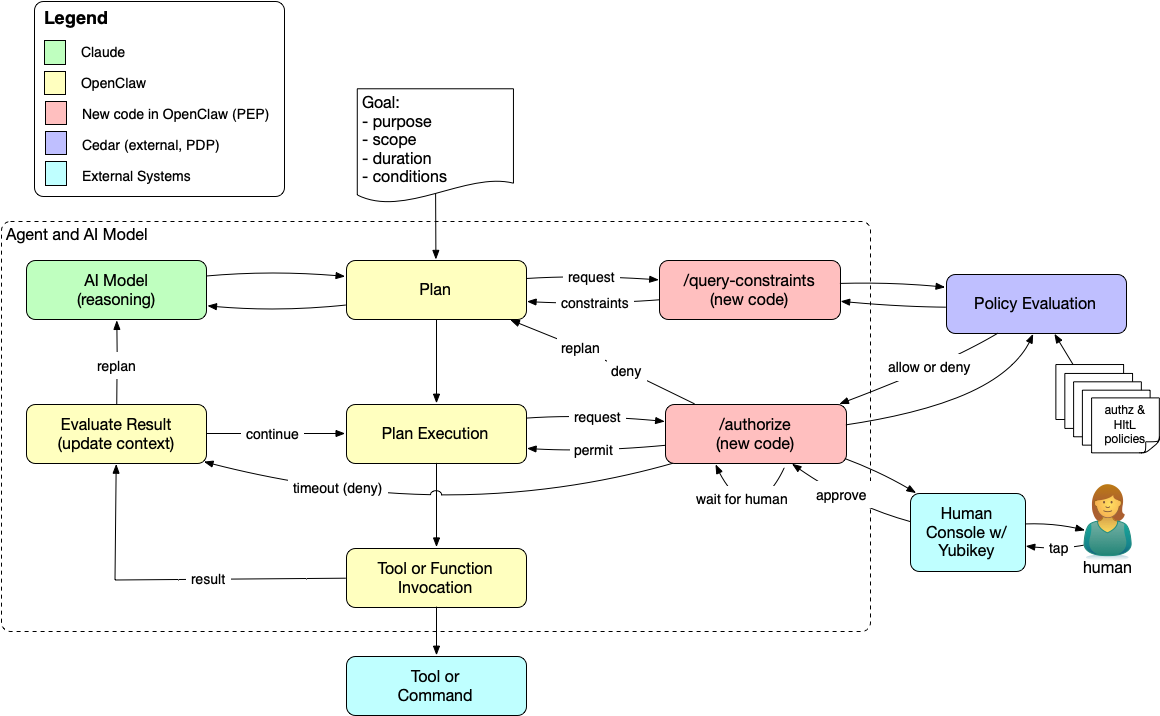
Earlier demos answered the question "may the agent do this?" This one answers a different question: "may the agent send this email now that a human has cryptographically attested to it?" The demo adds a simulated send_email tool to OpenClaw. Gathering information and drafting the message are ungated; the agent can read files and write a scratch draft just as before. Sending is different. The following diagram shows the agent loop from the earlier posts with the HItL modifications added.
Agent Loop with Human in the Loop Authorization (click to enlarge)
When the agent calls send_email, the PEP asks Cedar for a decision and gets a deny, because no human has approved the message. Cedar doesn't know anything about approval workflows; it just says no. The PEP intercepts that deny and interprets it. Because the tool is send_email, the PEP treats the deny as "not yet" rather than "no," and instead of returning it to the agent, it parks the request and waits for a human.
The human opens an approver page, reviews the recipient, subject, and body, and taps a Yubikey. The PEP then retries the Cedar request with the human's approval injected into the context. This time Cedar returns permit, and the email is "sent," which in the demo means a JSON file lands in a mailbox directory.
If nobody taps the key before the timeout (three minutes by default), the PEP returns a hard deny to the agent and doesn't wait again. You can see this in the diagram as the timeout path that runs from the /authorize box back to the agent's evaluation step. The agent learns that the send didn't happen and can replan or report back, but it can't try again and hope the human is more agreeable the second time.
The Cedar policies that enforce this are short. One permits SendEmail when a verified WebAuthn approval is present and matches the request; the other forbids it otherwise:
@id("hitl-1-allow-send-with-approval")
permit(
  principal,
  action == OpenClaw::Action::"ToolExec::SendEmail",
  resource
)
when {
  context has humanApproval &&
  context.humanApproval.verified == true &&
  context.humanApproval.method == "webauthn" &&
  context has requestHash &&
  context.humanApproval.requestHash == context.requestHash
};
The forbid policy is the same test negated. Since Cedar's forbid always overrides permit, the explicit forbid means that no other permit policy, now or added later, can accidentally open up email sending without a human. The timeout lives in the PEP rather than the policy because Cedar has no notion of the current time; it evaluates the context it's given, which is exactly what makes its decisions predictable.
Notice what the policies don't say. Nothing in them tells anyone to go find a human; Cedar just returns deny, the same answer it gives for any other forbidden action. The PEP is what turns that deny into a request for approval. It intercepts the decision before the agent sees it and interprets a deny on send_email as "waiting for a human" rather than "no." In other words, Cedar decides whether the action is allowed, and the PEP decides what a denial means. That division keeps the policy engine simple and deterministic, but it also means the rule about which denials a human can override lives in code, a point I'll come back to below.
A Passkey for Each Approval
The approval isn't a generic "the human said OK." The demo uses ordinary WebAuthn, the protocol behind passkeys, and binds the challenge to a hash of the specific request. When I tap the Yubikey, I'm signing a statement about this recipient, this subject, and this body. The requestHash check in the policy makes sure the approval Cedar sees matches the action the agent is actually trying to take. If the agent changes a word in the body after I approve, the hashes don't match and the send is denied.
Think about the difference between signing a check and signing a blank check. A blank check says "I trust whoever holds this"; a signed check for a specific amount to a specific payee says "I approve this." Most approval flows for agents are closer to the blank check: the human clicks "allow" once and the agent carries that authority forward. Binding each approval to a single request keeps the human's authority attached to the human's decision. The approval can't be replayed for a different message or stretched to cover the next ten sends.
The "human" part of human in the loop is only as strong as where the passkey lives. On a Yubikey or other roaming hardware key, the credential stays on the device and approval requires someone to physically present the key and touch it. In a software authenticator, like a browser's passkey store or a password manager, the WebAuthn ceremony succeeds just the same, but anything that can unlock that store can approve. The demo asks the browser for a cross-platform authenticator so you'll be prompted for the security key rather than Touch ID. For a while, at least, we don't expect software agents to physically insert and tap Yubikeys. That's the point.
Try It Yourself
The code is in the openclaw-cedar-policy-demo repository on GitHub, and the HItL README walks through running it. Clone the repo, but don't start with the HItL demo. It builds on the earlier ones, so work through the basic Cedar demo first to get the PDP, the PEP, and your OpenClaw configuration in place. The README also includes commands to verify that the earlier demos still pass once the HItL changes are added.
The README covers starting the PDP (which also serves the approver page), registering your Yubikey, and running a set of policy tests that don't need a key at all. The live walkthrough asks the agent to send a simulated email, and then you approve it on the approver page. If you let it time out instead, you'll see the agent receive the denial and no mailbox file appear. I'd recommend trying both; watching the agent handle the timeout says as much about the design as watching the approval succeed.
Shortcuts and the Road to Production
Like the other demos in this series, this one is built to show an architecture, not to run in production. It takes several shortcuts:
Simulated delivery—No email leaves the machine. An approved send writes a JSON file to demo/mailbox/sent/, named with a UTC timestamp.
No notification—Nothing tells you a request is waiting. You have to open the approver page yourself and watch for it.
One gated action, chosen in code—The policies name SendEmail directly, and the PEP is hard-coded to park any deny on send_email. Only that one tool requires a human, and the PEP, not policy, decides that a deny there should wait for approval. It will even park a send that some other policy forbids, asking for a tap that can't change the outcome.
One approver on localhost—The PDP serves the approver page, there's a single registered credential, and it has to run on localhost so the WebAuthn origin matches.
Trust in the authenticator—The demo asks for a roaming authenticator, but nothing verifies that the credential actually lives on hardware.
None of these change the architecture, and each points toward how you'd generalize it into a production system:
Policy-selected actions—Policy rather than code would decide which actions need a human, perhaps based on resource attributes like sensitivity or on the scope of a delegation. The PEP still interprets the deny, but it would take its cue from policy. For example, it could park only when every policy behind the deny carries an annotation like @hitl("required"), or use partial evaluation to confirm that human approval is the only thing standing between the request and a permit.
Approvers as principals—The approver would be a principal in the policy model, so Cedar could say who is allowed to approve what; approving a wire transfer and approving a calendar invite shouldn't require the same person.
An approval service—A dedicated service would replace the page served by the PDP and push requests to the approver's phone or other device.
Durable state and audit—The pending store would be durable and every approval would be logged, giving you an audit trail that ties each consequential action to a specific human decision.
Authenticator attestation—Checking the authenticator's attestation would let policy require hardware keys for the actions that matter most.
One more thing matters that no amount of cryptography fixes: the human has to see what they're approving. The Yubikey tap attests to the request hash, but the human decides based on what the approver page shows. If the display summarizes or hides part of the action, the attestation covers something the human never saw. A production approval UI needs to present the action faithfully, which is an old lesson from digital signatures that applies to agents just as well.
Humans Where They Matter
Putting a human in the loop for everything would defeat the purpose of having an agent. People who are asked to approve every action stop reading and start tapping, and a tap without attention is just a slower way of saying yes. The value of this design is that policy decides where the human belongs. Most actions flow through Cedar and never interrupt anyone. The few that carry real consequences stop and wait for a person who can see exactly what's about to happen.
Agents act on our behalf, and the authority they carry is ours. When the stakes are high, the agent shouldn't be able to decide on its own that we would have approved, and it shouldn't be able to argue its way past a prompt that says to ask. Placing the control in the harness, bound to a specific action and a physical key, keeps that decision where it belongs. We can build agents that treat our approval as a formality, or we can build ones where our approval is a real control. The second is harder, but it's the one that keeps people in charge of what's done in their name.
I have been working to make Manifold a good framework for building pico meshes, the kind I use for my network of LoRaWAN sensors. The new Manifold API doesn't have a UI like the old Manifold did. I want to use Home Assistant (HA) for that and recently created a custom HA integration. With the groundwork laid, it was time to move my actual sensor network onto the new framework running on the updated pico engine. This post describes that move and the problems I ran into, and fixed, along the way.
Manifold as a Framework for Pico Meshes
Manifold began as an application for managing your things and creating communities to group them together. The primary application was Safe and Mine, a QR-code-based tagging system to identify your keys, bags, and mugs. Manifold was expandable with custom applications (written in KRL) that could be added to each thing.
When I rebuilt it as the Manifold API, I stopped treating it as a finished app and started treating it as a framework, a set of domain rulesets other people can extend to build their own meshes. A pico mesh is a small network of independent, addressable computational things, each with its own state, its own rules, and its own relationships. It still supports Safe and Mine, but I wanted it to be more than that—a personal space to manage both inactive (like your mug) and active (like a temperature sensor) things. The reason to build on Manifold is ownership; the mesh belongs to the person who runs it, not to me and not to a platform, and they decide what connects to it and what it exposes.
That distinction is the whole point. I've been working for years to build alternatives to what I call the CompuServe of Things. A sensor network you rent from a vendor is legible to the vendor first and to you second. A sensor network that runs as your own pico mesh answers to you, and the framework underneath it exists to keep that relationship intact as the network grows.
The Network I Was Moving
The network I wanted to move is not a demo. It is a working LoRaWAN deployment I have written about before, starting with easier IoT deployments on Helium and then the temperature sensors in a remote pumphouse. I have temperature probes in the crawl space of my cabin, on the north side deck, and in my beehive in addition to the pumphouse. Those sensors report over Helium, and until now they ran on the old sensor-network code, essentially recreating the features of the Manifold framework in addition to their specific duties interpreting and managing the payloads received over LoRaWAN.
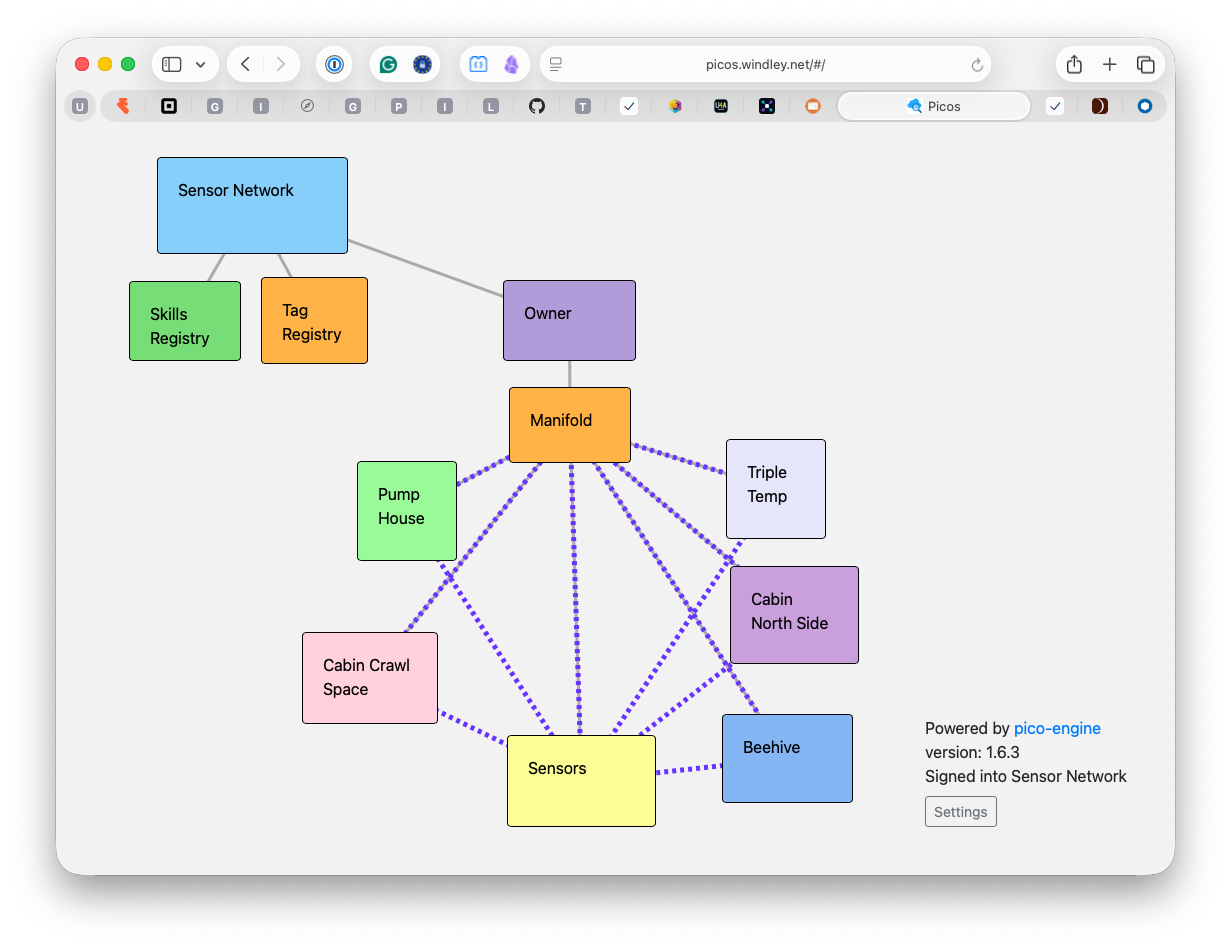
Rebuilding the network on top of Manifold simplifies the code and gives the sensors additional capabilities. Each sensor becomes a thing in a community, with an owner pico above the Manifold pico that ties the whole mesh together. The structure is easier to see than to describe, so here is the mesh as it stands after the move.
The sensor network as a pico mesh, with the owner and Manifold picos above the individual sensor things (click to enlarge)
Everything below the Manifold pico is a sensor or a community. The pumphouse, cabin crawl space, cabin north side deck, triple-temperature probe, and beehive are sensors. The Sensors pico is a Manifold community pico for the sensors. It handles things like notifications, sensor initiation, and reading aggregation. Moving to Manifold didn't change what the sensors measure, but it makes them more capable and manageable. And having them in a standard mesh means I can write HA integrations that work for lots of different meshes.
Home Assistant as the Interface
Because the new Manifold API has no interface of its own, I spent some time making Home Assistant fill that role. In Using Home Assistant with Manifold I described the integration: Home Assistant runs the pico engine's OAuth flow, comes away with a scoped token, and reads the mesh through it. That gives me dashboards, history, and alerts on software many people already run at home, without my having to write a UI of my own. The sensor network ships a companion Home Assistant component so its sensor things show up as real temperature and humidity entities, not just generic mesh objects. The code serves as an example of how to write HA companion components that work with the Manifold integration.
Where It Broke: OAuth Meets Webhooks
The initial port looked good. Every sensor came across, the communities lined up, and the readings flowed into the mesh the way they had before. The trouble started when I wired the mesh to Home Assistant, because that connection depends on the OAuth protection I added to the engine in Identity for the Pico Engine. Turning on OAuth secured the mesh against outside access, which is exactly what I wanted for Home Assistant; it also secured the mesh against webhook calls from Helium, which is not what I wanted at all.
Helium delivers sensor readings by calling a webhook defined on the pico for a specific sensor. The Helium console is software sitting outside my mesh that needs to POST data in, on its own schedule, with no human present to complete a login. The same protection that made Home Assistant's access deliberate and revocable made the inbound webhook fail with an authorization error. That is the tension at the center of this move: authentication that assumes a person in the loop breaks the moment a machine needs to knock on the door.
Two Ways Through
There are two reasonable ways to let a machine through without tearing down the protection around everything else. Picos define webhooks by creating channels. Each channel has a policy saying what events and queries are allowed on that channel.
Client-credentials channels. The engine already supports OAuth client credentials for a channel. I described this feature in Identity for the Pico Engine. A channel configured this way lets the caller authenticate as itself, against that one channel, rather than as a person against the whole mesh. You configure the bearer token in Helium as part of defining the webhook and Helium includes it on each POST.
Owner-declared exempt channels. Alternately, the mesh owner can mark a channel as exempt from the OAuth protection. This is only safe when the channel's policy is tight enough to keep the exemption from becoming an open door, and in this case it is, because the channel accepts one narrow shape of sensor data and nothing else.
Both of these approaches rely on the owner being careful about scoping the authority of the webhook so that it doesn't represent a security threat. Neither one weakens the mesh as a whole, and neither one hands a machine the standing of a person. I updated the pico engine to support the owner-declared exemption, so the choice now belongs where it should, with the person who runs the mesh, decided channel by channel rather than for the network all at once.
The Window onto the Mesh
With data flowing again, Home Assistant does exactly what I hoped. The dashboard at the top of this post is my cabin: the pumphouse, the crawl space, the north side deck, each updating every few minutes from the sensor network now running on Manifold. I get history, thresholds, and a picture of the current temperatures at a glance, all from software I run.
Home Assistant also makes alerting easier. I already had notifications on the old setup, but each one was its own bit of wiring off to the side; Home Assistant keeps the readings, the history, and the rules that act on them together in one place. I can build an automation directly on a reading, so a low temperature in the pumphouse sends me a notification while there is still time to act, rather than after a freeze has cracked a pipe and left the cabin without water. Having that alongside everything else I watch, instead of bolted on separately, is exactly what I want an interface for the mesh to do.
None of this is a new capability so much as a boundary drawn in the right place. The reading Helium sends and the reading Home Assistant shows are the same as they were a year ago. What changed is the software and systems are less creaky and easier to manage and update. The mesh belongs to the person who runs it, and Home Assistant is just a window onto it.
As part of our remodel, Lynne wanted lights over the built-in benches on either side of our fireplace. The fireplace itself made it hard to run both fixtures back to a single switch, so the easy path left us with one switch at each end of the hearth. That works, but it means anyone who wants the benches lit has to cross the room and flip two switches. It's a small annoyance, the first-world that the physical world imposes from time to time. Fortunately, software can fix it.
Both switches are Inovelli Blue Series 2-1 dimmers, Zigbee devices that report their state and take commands over the network as readily as a person flips them by hand. That makes them programmable in a way an ordinary switch is not; the paddle still does the obvious thing, but the switch is also something software can watch and control. I've leaned on that elsewhere in the house. One of them runs the bathroom fan, turning it on by itself when the humidity spikes and off again once the room dries out, so nobody has to remember.
The fix for the benches uses the same idea. Each light keeps its own switch, and a pair of Home Assistant automations wires the two together in software: when one switch turns on, it turns on the other, and the same for off. Flip either paddle and both fixtures respond, which is exactly how a three-way switch behaves when it controls a single light. Here there are two lights and two circuits that never meet in the wall, made to act as one from the automation layer instead.
And nothing about this arrangement is fixed, either. The same two switches could join a scene that dims the whole room for a movie, answer a voice command, or turn themselves off when the house goes to bed, none of which requires a visit from an electrician. Because the coordination lives in software rather than in the wiring, teaching the switches a new behavior simply requires writing another automation, not running another wire. The pairing I set up today is just the first thing I have asked them to do.
The wires in the wall didn't change; the behavior did. That's the beauty of adding a little software to a physical control: the constraints of the wiring are no longer the constraints of the room. When the layout fights you, you don't always have to open the wall. Sometimes you can just change what the switches do.
Over twenty-five years ago, I bought an Intel Play QX3 microscope for my kids to play with. It came with a CD-ROM holding the control software, which, as I recall, ran only on Windows. The microscope then spent the better part of two decades in the back of a cabinet in my office, gathering dust.
I pulled it out recently for my grandkids, hoping the Mac might simply recognize it as a camera. It didn't. I couldn't find any software that would run on a modern machine, and I was about ready to send the whole thing to the thrift store. Then I had an idea: what if I used Claude to write an app for it?
A morning later I had one, and my grandkids were watching the ridges of a seashell fill the screen. The interesting part of this story isn't the microscope; it's that building a custom app for a single obsolete device is now a morning's work instead of a project. That change is going to reshape what we expect software to be.
A Microscope With No Software
The QX3 is a small USB microscope that Intel and Mattel sold around the turn of the century. It magnifies at 10x, 60x, and 200x (using physcial lenses, not software); it has a camera in the head, a light on top and another in the stage, and a focus wheel. For a toy, it is genuinely good, and it still works exactly as well as it did in 2000. The problem is not the hardware; it is everything the hardware expects to talk to.
The QX3 predates USB Video Class, the standard that lets a modern operating system treat any conforming camera as a webcam with no driver at all. To macOS, the QX3 is not a camera; it is an unknown vendor-specific USB device, and the system has no idea what to do with it. Over the years, hobbyists filled that gap with their own drivers and apps for Linux and the Mac. Those projects are mostly dead now.
They died for an ordinary reason. Each one depended on the operating-system internals of its moment, and macOS kept moving: it went 64-bit, it tightened what kernel extensions could do, and it reworked its USB and camera frameworks more than once. Keeping a driver alive for a discontinued children's toy is a lot of unpaid work for an audience of a few, so the maintainers moved on and the code stopped building. The hardware still worked; the software around it rotted away.
Building It With Claude
I opened Claude in Cursor and worked in stages. I didn't begin with a plan for an app; I began by trying to talk to the device at all. Each stage did one small thing and proved it worked before I asked for the next.
Identify the device. I gave Claude the handful of facts the macOS "About This Mac" USB panel showed for the microscope: a vendor ID, a product ID, and not much else.
Blink the lights. I had Claude write a small command-line program that turned the microscope's LEDs on and off. That was the entire test: could code I control make something physical happen across the USB cable? It could.
See through it. Next came a command-line tool that pulled the image the microscope was seeing and saved a snapshot to a file.
Give it a face. Then a real Mac app with a window: switches for the two lights, a brightness slider, a live preview, and a button to take a picture.
Record. After that, movie capture and time-lapse, so my grandkids could watch an ant walk or a drop of water evaporate.
Clean it up. Finally the work that separates a demo from a tool: an app icon, a proper Quit item in the menu, and the usual round of small bug fixes.
The Windley Microscope app showing a live view of a seashell (click to enlarge)
The result is a few hundred lines of Swift that talk to the microscope directly over USB. I called it Windley Microscope, which is the kind of name you give something built for exactly one household. It does what the original Windows software did, and only what my grandkids and I actually want it to do.
Why This Works
The QX3 is easy to bring back precisely because it is old. A modern webcam sits behind several layers: USB Video Class, the camera framework, the operating system's device and privacy management. Those layers are what make a new camera "just work," and they are also what you cannot reach around when it doesn't. The QX3 has none of them.
A seashell captured through the QX3 (click to enlarge)
It sits right on the USB wire, speaking a simple protocol, with nothing between my code and the device. The same plainness that made it invisible to macOS made it straightforward to control myself; there was no abstraction to defeat, only a device to address. Simple architecture wins. When the platform declines to capture a device, you are not locked out of it; you are left free to talk to it on your own terms.
An App for an Audience of One
Here is the part that reaches past one microscope. A few years ago I would not have spent two weeks building a custom app to run a discontinued toy for my grandkids; the effort was far larger than the result was worth. I was happy to spend a morning. That shift changes the cost dynamics of software in a profound way.
An app no longer has to be a product. It does not need a market, a store listing, or a user base large enough to justify the build. It can be personal1: written for exactly what one person needs, and for no one else. There is a massive backlog of small software applications that never get written because the audience is one (or small) and the price was two weeks (or two years). That backlog has quietly become approachable. Imagine all the things that will be built because of this profound change in cost.
An important point: this is easy on a laptop because computers still let their owners run whatever code they write and talk to whatever hardware they plug in. It is not easy on iOS, where the platform, not the owner, decides what is allowed to run. The model that let me revive the QX3 in a morning barely exists on the devices most people actually use; that is a decision about how those platforms are built, not a fact of nature. As personal software becomes ordinary, it will press on that decision.
The microscope works again, and that is a small, good thing. The larger thing I got back is the ability to make the computer do the specific thing I want, without waiting for a company to decide enough other people want it too. That capability used to belong to firms with a market to serve. It is starting to belong to the rest of us.
Notes
Personal is not personalized. In 2026, a personalized system is one a company tunes to you from the data it collects about you; the tuning serves the company, and the surveillance that feeds it is the point. A personal app is the reverse: you build or commission it, it runs on your own machine, and it answers only to you. I mean personal in its older, plainer sense: software that belongs to you, not software aimed at you.
My new book, Authorization in Action, is now available from Manning. It's a book about the question that comes after we know who you are: what are you allowed to do? Knowing who someone is doesn't tell you what they should be able to touch, change, or spend. For most of the last two decades I've worked on the first question, proving who someone is; this book is about why the second one is now the one that matters, and how to build systems that answer it well.
The short version of the argument is one I didn't expect to be making a few years ago. Authentication, the act of proving who someone is, has become about as good as we can reasonably ask; passkeys and FIDO have quietly closed most of the gap that kept me up at night in 2005. Authorization, the act of deciding what someone can actually do, is still mostly improvised, buried in application code, and reinvented badly on every team. That imbalance is the reason the book exists.
How I Got Here
When I was CIO for the State of Utah in 2001, I noticed that nearly every problem that reached my desk had an identity component hiding inside it. Consolidating directories so every employee could have a utah.gov address, moving the state's website to a new domain, sorting out who could touch which system: none of these looked like identity problems on the surface, yet all of them turned on knowing who someone was and what they were permitted to do. I didn't have language for it then, but that observation set the direction for everything I've worked on since.
A few years later Doc Searls, Kaliya Young, and I started the Internet Identity Workshop (IIW), and it has now met 42 times. IIW has become the place where the identity community works on its hardest problems together. Along the way I wrote three books; Digital Identity helped enterprises build identity strategies, The Live Web moved the focus from organizations to individuals with their own data and APIs, and Learning Digital Identity finally named the thing I'd been circling for years: identity is fundamentally about relationships, not identifiers. Each book was really an attempt to answer a question the previous one had raised.
While I was finishing Learning Digital Identity, the next question came into focus, and conversations at IIW confirmed it. Knowing who someone is tells you almost nothing about what they should be able to do; the interesting, unsolved work all lives on the far side of authentication. That's the work my new book takes on.
The Second Question
The reason the second question is harder is that it's not one question but several, and they're the ones that actually govern what happens inside a system. What can this person do; under what conditions; on whose behalf; and in which context? Miss any one of them and the rest stop meaning much; the same request can be right for a manager at noon from the office and wrong for a contractor at midnight from an unknown device. A login gets you through the door, but it says nothing about which rooms you can enter, what you can carry out, or whether the person who sent you had the standing to send you at all.
In late 2022 I joined AWS Identity, and one of the teams we worked closely with was building Amazon Verified Permissions and the Cedar policy language. Working at that scale showed me something the theory hadn't: fine-grained authorization doesn't only make a system safer, it makes it more usable. When the rules about who can do what are explicit and external to the code, you can hand people exactly the access they need without either drowning them in prompts or handing over the keys to everything. Getting authorization right is how a system stays both safe and pleasant to use, and those goals stop fighting each other.
Then Came the Agents
What finally convinced me the world needed this book was AI. As agents begin acting on people's behalf, "what is this thing allowed to do, and on whose authority?" stops being a background concern and becomes the whole game. An agent that can read your calendar, spend your money, or send mail as you is only as trustworthy as the boundaries around it, and those boundaries are authorization. I've argued before that authorization is the hard problem in agentic AI, and nothing since has changed my mind.
This is where the technical question turns into a human one. If we can't say precisely what an agent may do on our behalf, we're left choosing between agents that can't do anything useful and agents we have to trust blindly; neither of those is a world I want to live in. Authorization is the infrastructure that lets us delegate real authority to software while keeping it bounded, accountable, and revocable. That's not a convenience feature. It's what makes it possible to act through machines without surrendering to them.
What's in the Book
Authorization in Action follows a fictional company, ACME, as it works its way from the tangled access-control code most teams start with toward policy-based authorization it can actually reason about. The book uses that story to get concrete about the models and mechanics—relationships, roles, attributes, policy languages, and the architecture that separates deciding from enforcing—rather than leaving them as abstractions. This is the book I needed on my own shelf while I was solving these problems as an enterprise architect at BYU, so it's aimed at the developers and architects who have to make these decisions everyday
Identity tells us who is involved. Authorization determines what happens next. I've come to believe that second question is quietly becoming the heart of security, governance, and trust online, and I hope the book makes the case as clearly to you as the last few years have made it to me. You can find Authorization in Action at Manning and coming soon to Amazon.