When you used a verifiable credential to prove something about yourself, the verifier can know cryptographically: (1) the identifiers for the issuer, (2) the credential hasn't been tampered with, (3) the credential was issued to you, and (4) the credential hasn't been revoked. These four checks are important because their establish the fidelity of the data being transferred. They don't, however, tell them whether they can trust the issuer. For that, they need to take the issuer's decentralized identifier (DID) that they got from credential presentation and determine who it belongs to.
At the most recent Internet Identity Workshop, Drummond Reed gave a session on how X.509 certificates could help with this. The first step, like always, is to resolve the DID and retrieve the DIDDoc that associates keys and endpoints with the DID. The endpoint can be an HTTP server and, of course, should have an X.509 certificate providing TLS security. That certificate, at the very least, has a a domain name to bind that to the certificate's public key. It can, if you pay for the feature, also include information about the entity that applied for the certificate. The certificate authority proofs that information and is vouching for it when they sign the certificate.
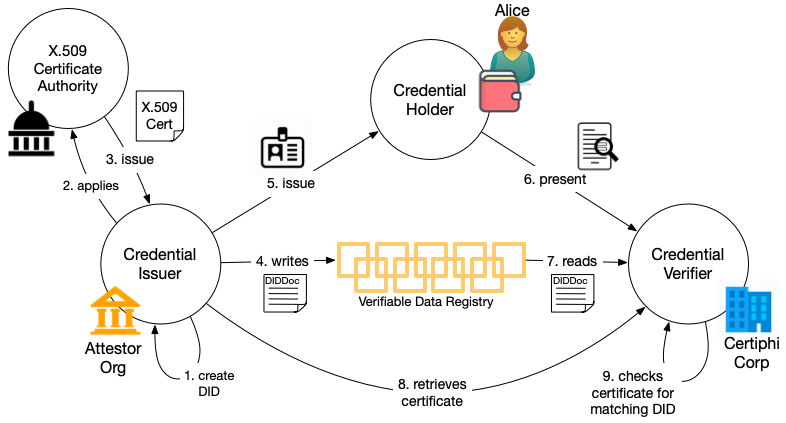
The key to making the X.509 certificate useful for checking the provenance of a DID lies in one key change. X.509 certificates can contain and extended field called a Subject Alternative Name. This following figure shows how it can help.
Using X.509 Certificates to establish the owner of a DID (click to enlarge)
In this figure:
The issuer (Attestor) creates the DID they will use to issue the certificate along with its associated DIDDoc, including an HTTP endpoint for DID verification.
Attestor applies for a X.509 certificate for that endpoint, including in the application the DID they created in (1).
The certificate authority does it's usual proofing of the application and issues a certificate that includes the DID in the Subject Alternative Name field.
The issuer creates a credential definition in the usual way that includes their DID and writes it to whatever Verifiable Data Registry their DID method dictates.
Attestor issues a credential to a holder (Alice) using that credential definition.
At some later time, Alice presents the credential to the verifier (Certiphi).
Certiphi resolves the DID to get the DIDDoc and retrieves the verfication endpoint from the DIDDoc
Certiphi retrieves the certificate for that endpoint1.
Certiphi verifies the certificate by checking it's signature and ensures that the DID in the DIDDoc for the credential matches the one in certificate.2
The issuer's DID has now been tied in a verifiable way to whatever information is in the certificate. Provided the certificate includes information about the entity beyond the domain name, the verifier can use that information to determine whether or not the credential is authentic (i.e., issued by who the credential definition purports issued it). That might be all the evidence they need to determine whether to trust the entity. Certificate authorities could also issue verifiable credentials to the customer attesting the same verified claims—after all, it's one more product they can offer.
The benefit of doing issuer validation using X.509 certificates is that there are already many trusted X.509 certificate authorities in business who already do proofing of attributes about businesses. That's a huge chunk of the verifiable data ecosystem that doesn't need to be built because it can be leveraged. To make this work, digital certificate authorities would need to start offering to validate DIDs and include them in a certificate as a Subject Alternative Name. I don't discount that this will take some bureaucratic maneuvering. Certificate authorities will need to see a business opportunity. I'd love to see Digitcert or someone do a pilot on this.
Notes
Note that this step might be combined with the previous step if the Verifiable Data Registry is the same server as the endpoint, but that's not necessarily going to be the case for a number of reasons.
Note that this does not create a call back wherein Attestor can determine which credential was used, preserving the privacy of the presentation. Attestor does know one of its credentials has been presented to Certiphi. If this information leakage bothers you, then any web-based DID method is potentially a problem.
Identity is the ability to recognize, remember, and react to people, organizations, systems, and things. In the current web, companies employ many ponderous technological systems to perform those functions. In these systems, we are like ghosts in the machines. We have "accounts" in companies' systems, but no good way to recognize, remember, and react to them or anyone else. We are not digital embodied.
One of the great benefits of embodiment is the ability to form and operationalize rich digital relationships. I've written a lot about the nature of digital relationships.
One of the discussions at VRM Day caused me to think about a feature of digital relationships I hadn't considered before. Someone said that if you think about a graph with people (or things, organizations, and so on) as the nodes, the relationships are the edges, like so1:
A single, bi-directional relationship (click to enlarge)
In this figure Alice and Bob have a bi-directional relationship. This is how I've normally thought about it and how I'd have drawn it. But in today's discussion, someone said that the relationship is shared and that Alice and Bob both control it. But I realized that viewpoint is too simple. Specifically, Alice and Bob each have a different perspective of that relationship and will use it separately.
For example, imagine that Alice is the cashier at a grocery store and Bob is a customer. Alice gives great service, so Bob seeks her out when he shops. Alice on the other hand has no particular recollection of Bob from encounter to encounter. For Alice, the relationship is ephemeral, but for Bob, it's longer term. The nature of each relationship is different. So, we might look at it like this:
Two uni-directional relationships (click to enlarge)
But after discussing it some more, I realized that these relationships aren't independent. They're entangled like this:
Entangled relationships (click to enlarge)
In the example I gave above, as Bob seeks out Alice more and more, Alice might come to recognize him and call him by name, changing the nature of her relationship with Bob. And that may influence the nature of Bob's relationship with Alice. Over time, these interactions influence both relationships. So, while Alice and Bob both have control over their relationship with the other, actions by one influence the other.
I frequently say that we don't build identity systems to manage identities, but rather to manage relationships. The problem with contemporary identity systems is that they are all one sided, controlled by one party—almost always a company. As I've said before, people are not digitally embodied and thus have no good way to manage their online relationships. As we strive to build better digital identity systems, I think it's paramount that we build systems that provide people with tools that embody them and provide them with the ability to operationalize their online relationships. These are more than decentralized; they are self-sovereign.
Notes
Peer decentralized identifiers (DIDs) are a great technology for creating bi-directional relationships.
I don't know if you recall the game Kerplunk. It's a classic children's game that has been around for decades. I remember playing it with my sister. The basic setup involves a transparent plastic tube, a number of sticks, and marbles. The sticks are threaded through the tube to form a web or nest at the bottom on which the marbles rest. We'd take turns removing a stick at a time, trying not to let any marbles fall through the web and out of the tube. At some point, the remaining sticks can't hold the marbles and everything falls down.
The modern web reminds me more and more of a big Kerplunk game and I think the marbles are about to fall. What started out as an easier way to do things like shop, bank, and get health care information has become increasingly complex over time. More and more of the email I receive seems to be simply directing me to log into some bespoke system to retrieve a message or engage in some workflow. And even with a password manager, the act of logging in is often a chore with different user interfaces, custom MFA requirements, and weird rules for passwords. Once you're on the system, session time-outs induce their own form of anxiety since stepping away for a few minutes to attend to something else might require going through the whole Kafkaesque process all over again. The modern web has turned into a dystopian theater of the absurd where even reading a simple appointment reminder from your doctor requires several minutes of stress-inducing interaction with baroque systems and processes.
And it's not just doctors, of course, banks, government agencies, hospitals, ecommerce sites, and customer service systems all adopt these special purpose messaging systems. If you ask these organizations why they use bespoke messaging systems, they'll list things like "timely and improved communication," "convenience," and "privacy and security." But the real reason is that it's more convenient for them because these systems are integrated with their backends and make their processes more manageable. There's certainly nothing about them that's more convenient, timely, or better than email for their customers1.
I also question the privacy and security premise. Email can be insecure. And your email provider can see the contents of your emails. But the messaging system run by your doctor or bank is likely less secure than the email systems run by Apple, Google, and the others. And achieving privacy by making everything incompatible so that you have to use a different system for each correspondent is like chopping off your finger to prevent hangnails.
How did we get here? Bureaucracy. Not just government bureaucracy, but bureaucracy of all kinds. In Utopia of Rules2, David Graeber talks about how power imbalances force the less powerful group to perform what he calls interpretive labor, the work of understanding and implementing what's better or more convenient for the more powerful partner. People are not equal participants in online interactions. We don't have the tools to be fully embodied online3. Because of this we are forced to play by the rules organizations online who are digitally embodied with servers, identity systems, customer management systems, and so on. And part of that is being forced to use their inconvenient and anemic messaging systems.
What's the answer? People need tools. I think digital wallets (a bad name for an important tool), autonomic (peer) identifiers with strong cryptography, and verifiable credentials are a huge step forward. These tools provide the means for people to be peers online rather that mere ghosts in someone else's machine. That's why I insist on using the term self-sovereign rather than decentralized to describe these systems. Cogito Ergo Sum.
Notes
For a deeper dive into why one-off messaging systems are never as good as email, see Rich Sharing and Personal Channels. Email and other useful messaging systems exhibit a property called rich sharing that makes them much more robust that the simple idea of "sharing a message" would bring to mind.
If you're interested in power imbalances and how they come about, I can't recommend Graeber's book highly enough. He had such a keen understanding of this problem and wrote about it in a way that's both informative and entertaining.
My wife, Lynne, recently gave me a copy of Peter Zeihan's book, The Accidental Superpower: Ten Years On. The book was originally published in 2014, but Zeihan has updated it by inserting chapters talking about what he got right in 2014, what he got wrong, and why. The focus of the book is geopolitics—how geography and demographics shapes the world order—and how Bretton Woods changed that in significant ways. The book makes the case that so much of what made Bretton Woods useful to the US and why the US engaged with the rest of the world for the 70 years following World War II is changing. As it changes the free trade system enabled by Bretton Woods is also changing. This will have significant impact on every country in the world.
Much of what changes has to do with energy. One of the things1 Zeihan got right was his assertion that unlike much of the rest of the developed world, the US doesn't need to import energy—specifically oil—we are a net energy importer. This changes the dynamic wherein the US is willing to be the protector of shipping lanes for the entire world. As a result, the future could see a US that has the luxury of ignoring events in the Middle East, Ukraine, and elsewhere, whereas Europe (to take just one example) cannot. The book is full of other interesting predictions and conclusions just like this one. I encourage you to read it if you find this as fascinating as I do.
But, solar and wind are not just renewable, they also allow energy production to be decentralized in ways oil and natural gas can't. Oil and natural gas deposits are where they are. Some countries are blessed with them and the others have to buy from those countries. And they're often far away, requiring shipping through potentially hostile waters. But that's not true of renewables. They can usually be built and located where ever the need is2. This changes geopolitical equation in significant ways. Areas of the world that are not energy independent, like Europe, are moving toward renewables too slowly to prevent future energy shocks. The problem with renewables is that they're long-lead items—they take years to plan and bring online.
Petroleum and Bretton Woods enabled the modern world, providing portable, storable sources of energy that could easily and safely move to where ever it was needed.3 If we are indeed at the end of the Bretton Woods era, the world is in for significant changes as it adjusts to a life where free trade, and easy access to petroleum-based energy, cannot be assumed. Moving energy production closer to the places it's used is one strategy for dealing with this world-altering disruption. Buckle up.
Notes
There are other things that are important to the books overall conclusion besides energy. I'm just cherry picking that because I was thinking about it. For example, the US is largely self-sufficient from an overall import/export standpoint. We don't import nearly as much as many other countries and could replace what we do import relatively easily.
It's not just renewables. Nuclear power can also be located closer to demand than an oil deposit. I started my career as a nuclear metallurgist, so I'm a fan. I think many countries are going to be sorry they've closed nuclear plants and made them too hard to construct profitably.
The feats of engineering that have enabled these energy flows is truly astounding.
I recently spoke with Riley Hughes of Trinsic on his Future of Identity podcast about the birth of Sovrin Foundation, its inevitable growing pains, self-sovereign identity, identity metasystems, and adoption. Give it a listen.
I'm grateful to Riley for having me on as a guest.
Presenting your ID to buy beer is used so often as an example of how verifiable credentials work that it's cliche. Cliche or not, there's another aspect of using an ID to buy beer that I want to focus on: it's an excellent example of zero trust
Zero Trust operates on a simple, yet powerful principle: "assume breach." In a world where network boundaries are increasingly porous and cyber threats are more evasive than ever, the Zero Trust model centers around the notion that no one, whether internal or external, should be inherently trusted. This approach mandates continuous verification, strict access controls, and micro-segmentation, ensuring that every user and device proves their legitimacy before gaining access to sensitive resources. If we assume breach, then the only strategy that can protect the corporate network, infrastructure, applications, and people is to authorize every access.
From Zero Trust Referenced 2024-02-09T08:25:55-0500
The real world is full of zero trust examples. When we're controlling access to something in the physical world—beer, a movie, a boarding gate, points in a loyalty program, prescription drugs, and so on—we almost invariably use a zero trust model. We authorize every access. This isn't surprising, the physical world is remarkably decentralized and there aren't many natural boundaries to exploit and artificial boundaries are expensive and inconvenient.
The other thing that's interesting about zero trust in the physical world is that authorization is also usually done using Zero Data. Zero data is a name StJohn Deakin gave to the concept of using data gathered just in time to make authorization and other decisions rather than relying on great stores of data. There are obvious security benefits from storing less data, but zero data also offers significantly greater convenience for people and organizations alike. To top all that off, it can save money by reducing the number of partner integrations (i.e., far fewer federations) and enable applications that have far greater scale.
Let's examine these benefits in the scenario I opened with. Imagine that instead of using a credential (e.g., driver's license) to prove your age when buying beer, we ran convenience stores like a web app. Before you could shop, you'd have to register an account. And if you wanted to buy beer, the company would have to proof the identity of the person to ensure they're over 21. Now when you buy beer at the store, you'd log in so the system could use your stored attributes to ensure you were allowed to buy beer.
This scenario is still zero trust, but not zero data. And it's ludicrous to imagine anyone would put up with it, but we do it everyday online. I don't know about you, but I'm comforted to know that every convenience store I visit doesn't have a store of all kinds of information about me in an account somewhere. Zero data stores less data that can be exploited by hackers (or the companies we trust with it).
The benefit of scale is obvious as well. In a zero data, zero trust scenario we don't have to have long-term transactional relationships with every store, movie, restaurant, and barber shop we visit. They don't have to maintain federation relationships with numerous identity providers. There are places where the ability to scale zero trust really matters. For example, it's impossible for every hospital to have a relationship with every other hospital for purposes of authorizing access for medical personal who move or need temporary access. Similarly, airline personal move between numerous airports and need access to various facilities at airports.
Finally, the integration burden with zero trust with zero data is much lower. The convenience store selling beer doesn't have to have an integration with any other system to check your ID. The attributes are self-contained in a tamper-evident package with built-in biometric authentication. Even more important, no legal agreement or prior coordination is needed. Lower integration burden reduces the prerequisites for implementing zero trust.
How do we build zero data, zero trust systems? By using verifiable credentials to transfer attributes about their subject in a way that is decentralized and yet trustworthy. Zero data aligns our online existence more closely with our real-world interactions, fostering new methods of communication while decreasing the challenges and risks associated with amassing, storing, and utilizing vast amounts of data.
Just-in-time, zero data, attribute transfer can make many zero trust scenarios more realizable because it's more flexible. Zero trust with zero data, facilitated by verifiable credentials, represents a pivotal transition in how digital identity is used in authorization decisions. By minimizing centralized data storage and emphasizing cryptographic verifiability, this approach aims to address the prevalent challenges in data management, security, and user trust. By allowing online interactions to more faithfully follow established patterns of transferring trust from the physical world, zero trust with zero data promotes better security with increased convenience and lower cost. What's not to like?
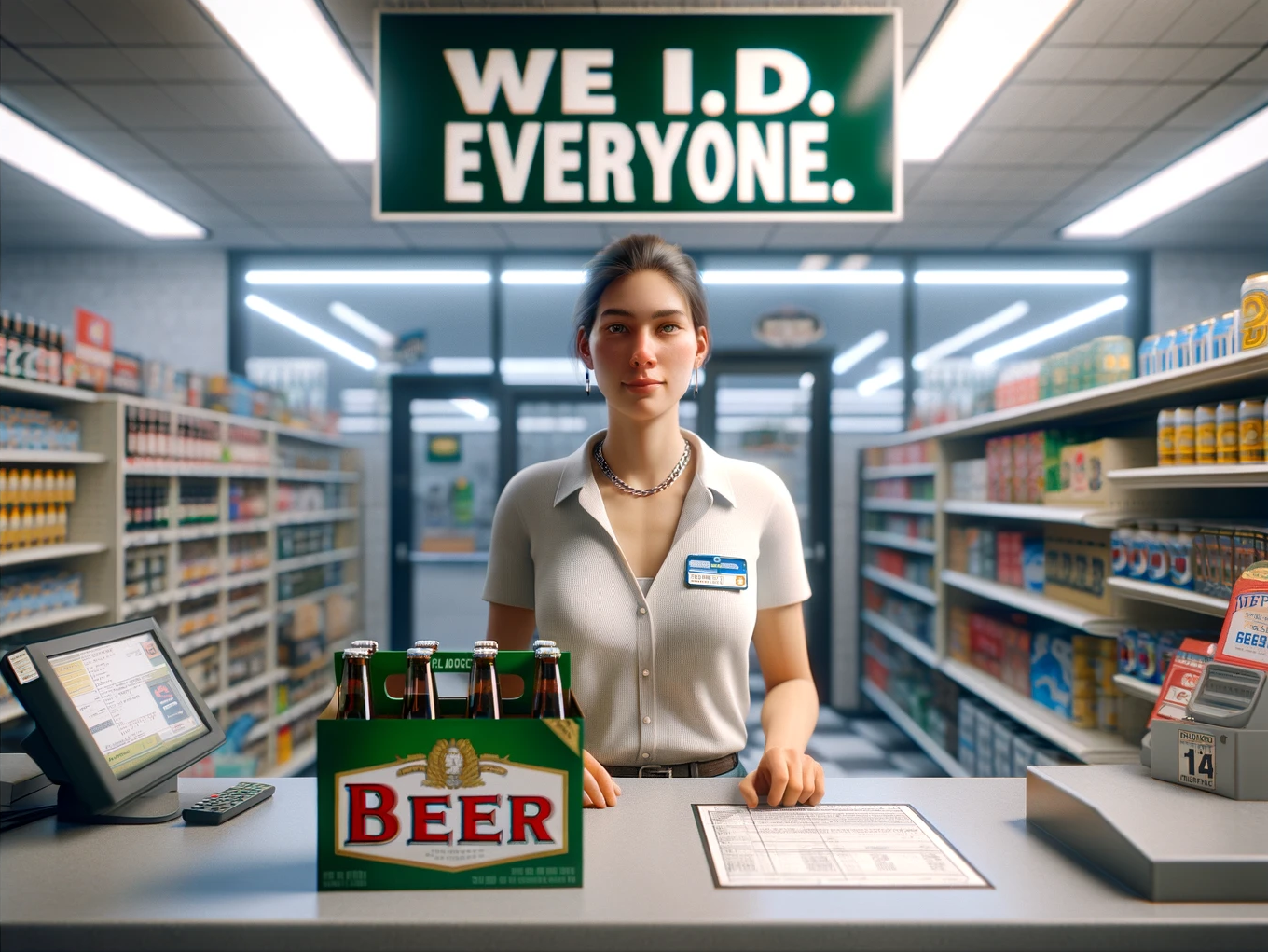
Photo Credit: We ID Everyone from DALL-E (Public Domain) DALL-E apparently thinks a six-pack has 8 bottles but this was the best of several attempts. Here's the prompt: Produce a photo-realistic image of a convenience store clerk. She's behind the counter and there's a six pack of beer on the counter. Behind her, clearly visible, is a sign that says "We I.D. Everyone" .
When I hand a merchant in London a piece of plastic that I got from a bank in Utah to make a purchase, a tiny miracle happens. Despite the fact that the merchant has never met me before and has no knowledge of my bank, she blithely allows me to walk out of the store with hundreds of dollars of merchandise, confident that she will receive payment. I emphasized the word confident in the last sentence because it's core to understanding what's happened. In the past, these kinds of transactions required that the merchant trust me or my bank. But in the modern world, trust has been replaced by confidence.
We often mix these concepts up and I'm as guilty as anyone. But trust always involves an element of risk, whereas confidence does not. These are not binary, but rather represent a spectrum. In the scenario I paint above, the merchant is still taking some risk, but it's very small. Technology, processes, and legal agreements have come together to squeeze out risk. The result is a financial system where the risk is so small that banks, merchants, and consumers alike have confidence that they will not be cheated. There's a name in the financial services industry for the network that reduces risk so that trust can be replaced with confidence: an acceptance network.
Acceptance Networks
An acceptance network is the network of merchants or service providers that accept a particular form of payment, usually credit or debit cards, from a particular issuer or payment network. The term refers to a broad ecosystem that facilitates these transactions, including point-of-sale terminals, online payment gateways, and other infrastructure. Each component of the acceptance network plays a crucial role in ensuring that transactions are processed efficiently, securely, and accurately. This drives out risk and increases confidence. Acceptance networks are foundational components of modern payment ecosystems and are essential to the seamless functioning of digital financial transactions. Visa, Mastercard, American Express, and Discover are all examples of acceptance networks.
Before the advent of acceptance networks, credit was a spotty thing with each large merchant issuing it's own proprietary credit card—good only at that merchant. My mom and dad had wallets full of cards for JC Penney, Sears, Chevron, Texaco, and so on. Sears trusted its card. Chevron trusted its card. But it was impossible to use a Chevron card at Sears. They had limited means to verify if it was real and no way to clear the funds so that Chevron could pay Sears for the transaction.
That scenario is similar to the state of digital identity today. We have identity providers (IdPs) like Google and Apple who control a closed ecosystem of relying parties (with a lot of overlap). These relying parties trust these large IdPs to authenticate the people who use their services. They limit their risk by only using IdPs they're familiar with and only accepting the (usually) self-asserted attributes from the IdP that don't involve much risk. Beyond that they must verify everything themselves.
Fixing this requires the equivalent of an acceptance network for digital identity. When we launched Sovrin Foundation and the Sovrin network1 in 2016, we were building an acceptance network for digital identity, even though we didn't use that term to describe it. Our goal was to create a system of protocols, processes, technology and governance that would reduce the risk of self-sovereign identity and increase confidence in an identity system that let the subjects present verifiable credentials that carried reliable attributes from many sources.
I've written previously about identity metasystems that provide a framework for how identity transactions happen. Individual identity systems are built according to the architecture and protocols of the metasystem. Acceptance networks are an instantiation of the metasystem for a particular set of users and types of transactions. A metasystem for self-sovereign identity might have several acceptance networks operating in it to facilitate the operation of specific identity systems.
Problems an Acceptance Network Can Solve
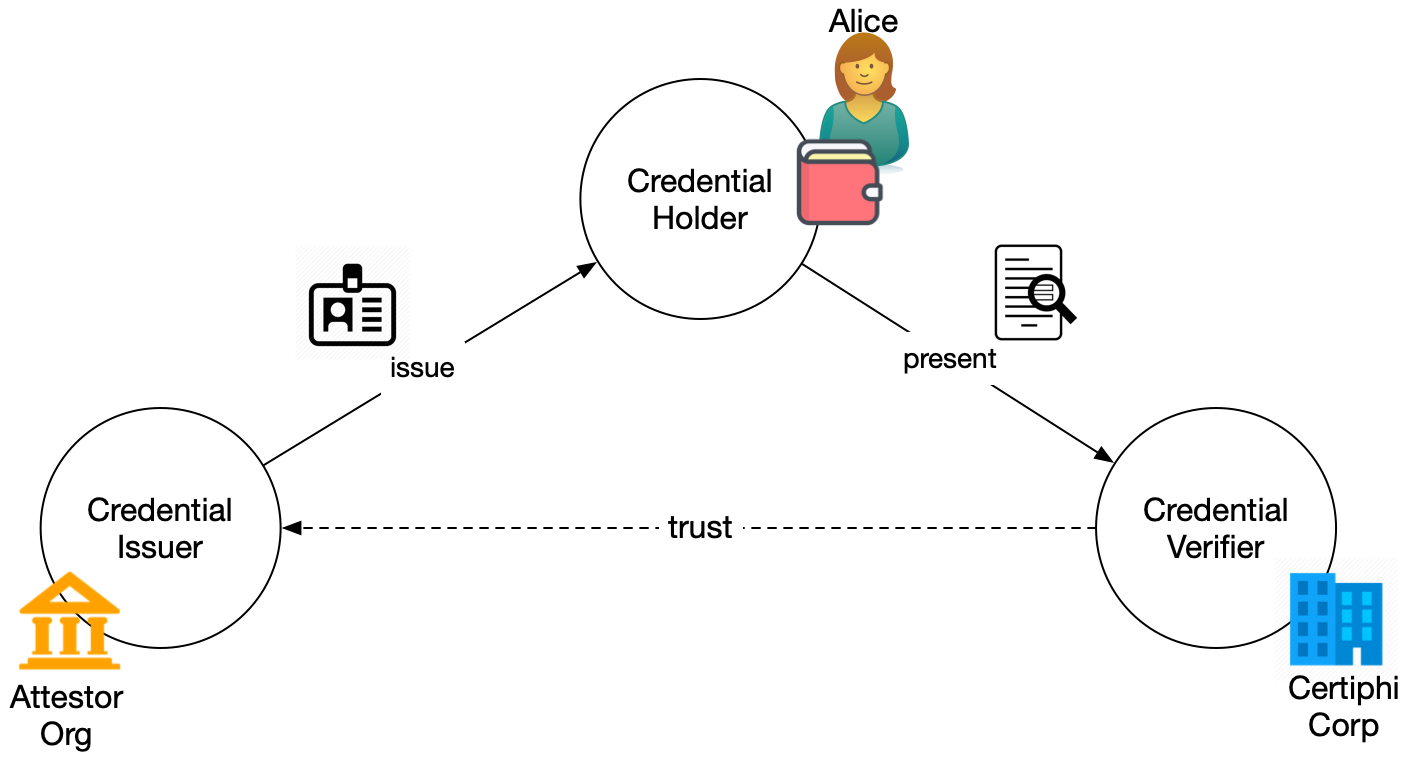
To understand why an acceptance network is necessary to reduce risk and increase confidence in identity transactions, let's explore the gaps that exist without it. The following diagram shows the now familiar triangle of verifiable credential exchange. In this figure, issuers issue credentials to holders who may or may not be the subject of the credentials. The holder presents cryptographic proofs that assert the value of relevant attributes using one of more of the credentials that they hold. The verifier verifies the proof and uses the attributes.
Verifiable Credential Exchange (click to enlarge)
Let's explore what it means for the verifier to verify the proof. The verifier wants to know a number of things about the credential presentation:
Were the credentials issued to the entity making the presentation?
Have any of the credentials been tampered with?
Have any of the credentials been revoked?
What are the schema for the credentials (to understand the data in them)?
Who issued the credentials in the proof?
The first four of these can be done cryptographically to provide confidence in the attestation. The technology behind the credential presentation is all that's necessary. They can be automated as part of the exchange. For example, the proof can contain pointers (e.g., DIDs) to the credential definitions. These could contain public keys for the credential and references to schema.
The last one—who issued the credential—is not a technical matter. To see why, imagine that Alice (as holder and subject) has been issued a credential from her university (the issuer) giving information about her educational experiences there. She's applying for a job and wants to present the credential to a prospective employer (the verifier). How does the employer know that Alice didn't just make the credential herself or buy it from a diploma mill?
Knowing who issued the credential is not something that can be done solely with technology (although it can help). The employer in this scenario wants more than an identifier for the issuer. And they want to know that the public key really does belong to the university. In short, the employer wants to resolve the identifier to other information that tells them something about the university and the credential. There are lots of ways to do that—people have been doing this sort of thing for centuries: states keep registries of businesses (universities are businesses), accreditation organizations keep registries of schools they've accredited, the Department of Education has registries of various institutions of higher education in the US, and so on.
The employer could make use of these by building its own database of university identifiers it trusts. And every time a new one shows up, they could investigate and add it to their registry (or not)2. But going back to the magic of the credit card scenario that I opened this article with, if every merchant had to keep their own registry of banks, the experience wouldn't be magical for me or the merchant. The financial acceptance network makes it easy for the merchant to have confidence that they'll be paid because they have not only technology, but processes, protocols, governance, and legal agreements that make the verification process automatable.
Acceptance Networks for Digital Identity
For some use cases, keeping your own registry of the issuers you trust works. But for many, it's just too much work and makes it difficult to make use of a variety of credentials. This kind of "localized trust" is unwieldy in an identity system that might involve millions of issuers and identifiers and credentials for billions or even trillions of subjects. I've written extensively about identity metasystems and what they provide to help bridge the gap. This one, on how metasystems help provide life-like identity for digital systems is perhaps the most comprehensive. Acceptance networks implement metasystems.
An acceptance network for digital identity must have a number of important properties, including the following:
Credentials are decentralized and contextual—There is no central authority for all credentials. Every party can be an issuer, a holder (identity owner), or a verifier. Verifiable credentials can be adapted to any country, any industry, any community, or any set of trust relationships.
Credential issuers decide on what data is contained in their credentials—Anyone can create a credential schema for their use case. Anyone can create a credential definition based on any of these schemas.
Verifiers make their own trust decisions about which credentials to accept—There's no central authority who determines what credentials are important or which are used for what purpose. The acceptance network supplies the technical underpinnings for credential exchange and support protocols for automating the verification of credential issuers.
Credential verifiers don't need to have any specific technical, contractual, or commercial relationship with credential issuers—Verifiers do not need to contact issuers to perform verification.
Credential holders are free to choose which credentials to carry and what information to disclose—People and organizations are in control of the credentials they hold (just as they are with physical credentials) and determine what to share with whom.
You may be thinking "but these are mostly about decentralized decision making." While it would be easier to imagine the acceptance network as a big directory, that solution can't possible support all the different ways people and organizations might want to use credentials. That doesn't mean an acceptance network couldn't be run by a single organization, like some financial services networks. Just that it has to support a variety of credential ecosystems running common protocols. I also think that there will be more than one and most issuers and verifiers will be part of several (again, like in financial services).
Structure of an Acceptance Network
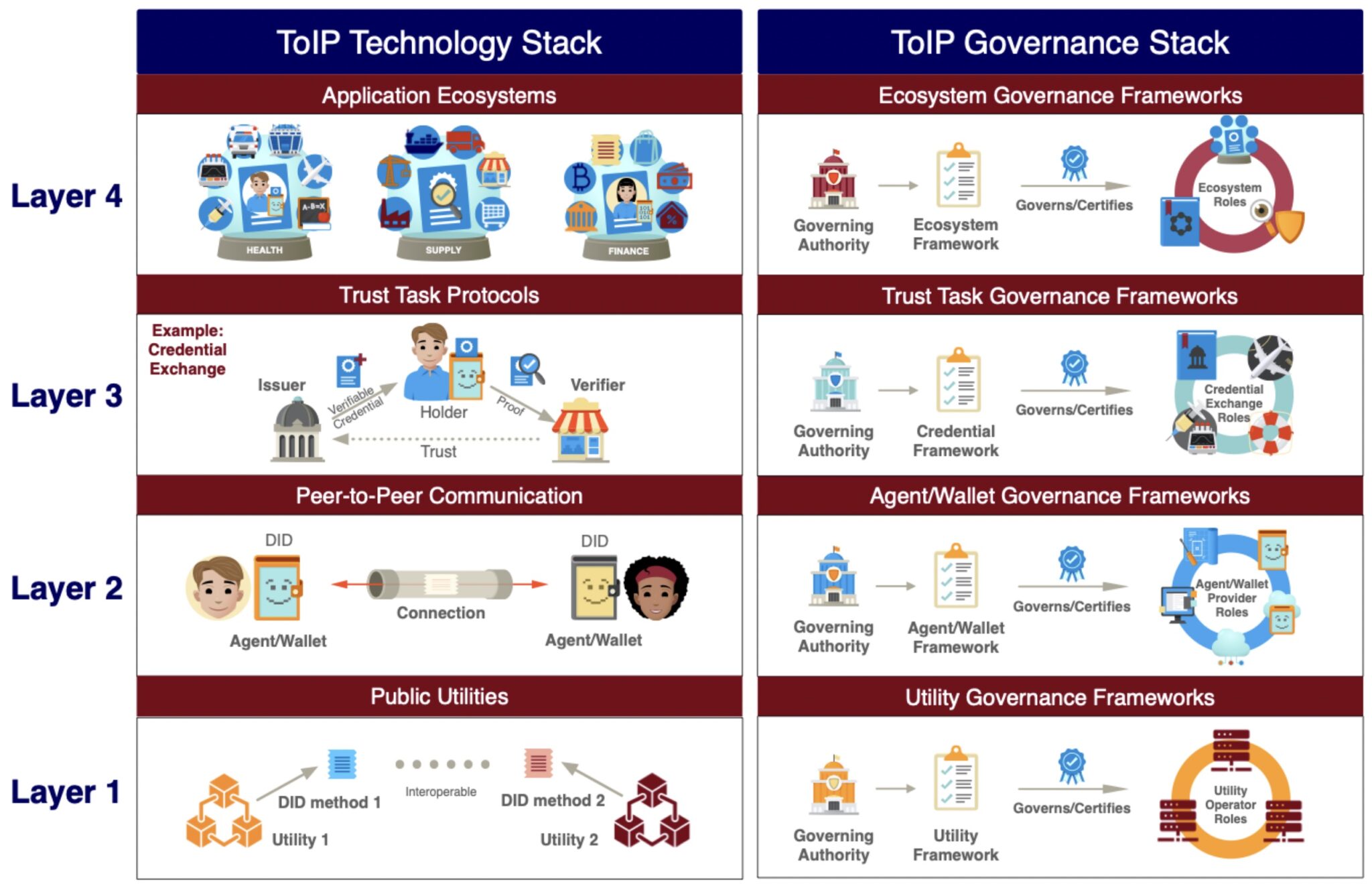
One of the things we can take away from the architecture of financial services acceptance networks is that they are built in layers. No one has thought more about how this can work than Drummond Reed and the Trust Over IP Foundation (ToIP).3 This figure, from ToIP, shows how such a stack works.
Trust Over IP Stack (click to enlarge)
The layers build on each other to provide something the lower level didn't. Layer 1 is the foundational functionality, like DID methods. Layer 2 builds on that to support creating digital relationships with anyone. Layer 3 uses those relationships to effect credential exchange. Layer 4 is the ecosystems that say things about the issuers for different use cases. The dual stack emphasizes the need for governance at every layer.
The acceptance network specifies the accepted protocols and technologies. The acceptance network also supports ecosystems, providing governance models and technology. The acceptance network is involved at each layer. Here are some examples of things an acceptance network might do at each layer:
Layer 1—limit the allowed DID methods and certify them.
Layer 2—require that wallets and agents using the network support specific versions of the DIDComm protocol. Provide a certification framework for wallet and agent vendors for security and interoperability.
Layer 3—require specific versions of the exchange protocols. Participate in protocol development. Provide a certification framework for specific implementations to aid with security and interoperability.
Layer 4—support the formation, certification, and discovery of credential ecosystem providers. Govern what is required to be a certified ecosystem provider and provide models for acceptable ecosystem governance.
As part of it's overall governance of the ecosystem, the acceptance network also provides model legal agreements for and between the various participants, trust mark rights (think of the Visa logo), and drives a uniform user experience.
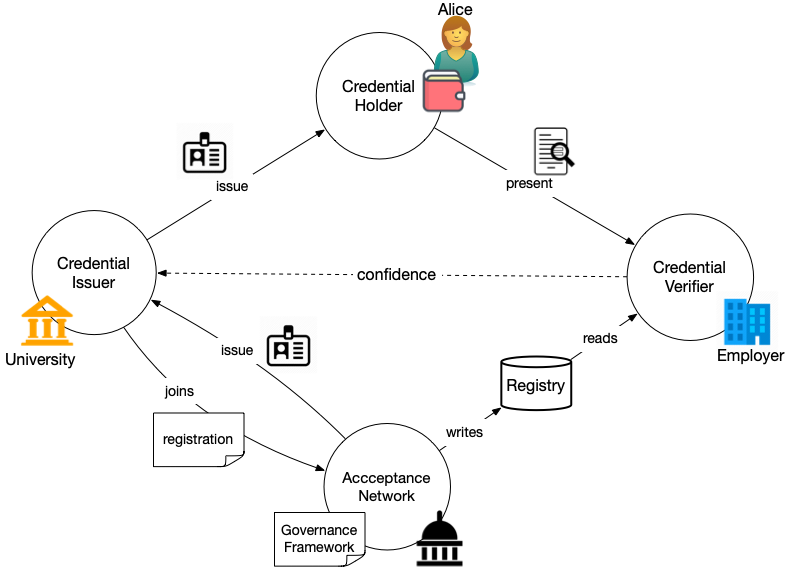
The following diagram shows the credential exchange from the preceding figure with an acceptance network providing support to the verifier so that it can have confidence in the data the issuer has supplied through the holder.
Acceptance Network in Operation (click to enlarge)
Credential issuers who know their credential might be widely used would join one or more acceptance networks. They agree to follow the rules and regulations in the governance framework of the acceptance network. The acceptance network issues a credential to them that they can use to prove they are a member.4 The acceptance network maintains a registry—likely a registry of registries—that verifiers can use to discover information about the issuer of a credential that has been presented to them.
Using an Acceptance Network
Returning to our previous scenario, Alice holds a credential issued by her university. She presents it to a prospective employer who wants to know that the credential is from an accredited university. Alice's university has been accredited by an accreditation organization5. They have followed their process for accrediting Alice's university and issued it a credential. They have also added the university to their registry. The university and the accrediting organization are members of an acceptance network. The employer's systems know to automatically query the acceptance network when it received a credential proof from a issuer it does not know. Doing so provides the assurance that the issuer is legitimate. It could also provide information about the accreditation status of the university. This information reduces the risk that the employer would otherwise bear.
In this scenario, the employer is trusting the processes and structure of the acceptance network. The employer must decide which acceptance networks to use. This is much more scalable than having to make these determinations for every credential issuer. The acceptance network has allowed the verification process to scale and made the overall use of verifiable credentials easier and less risky.
A Note on Implementation
This discussion of acceptance networks has undoubtedly brought images to your mind about how it is structured or how to build one. The comparison to financial services acceptance networks points to a network run by an organization. And the term registry brings to mind a database of some kind. Why these are certainly possibilities, I think it's also possible to imagine more decentralized solutions. For example, the registry could be a distributed ledger or blockchain. The governance is likely most easily done by an organization, but there are other options like a decentralized autonomous organization (DAO). The scenario I described above illustrates a federated system where certifying authorities for specific ecosystems determine their own methods, processes, and requirements, but link their registry to that of the acceptance network.
Conclusion
As I mentioned above, we've been solving the problem of how to know which institutions to trust for centuries. We have ways of knowing whether a university is accredited, whether a bank is real, whether a company is actually registered and what its reputation is. What is missing is an easy way to make use of this information digitally so that processes for reducing risk can be automated. Acceptance networks rationalize the process and provide the needed tooling to automate these checks. They reduce the many-to-many problem that exists when each verifier has to determine whether to trust each issuer with a more scalable many-to-several system. Acceptance networks allow credential presentation to scale by providing the needed infrastructure for giving verifiers confidence in the facts that holders present to them.
Notes
You can see in the linked post how we used trust to describe what we were building, even as we were reducing risk and inspiring confidence.
Note that this investigation could make use of technology. Knowing the universities name, they could look up a well known location on the universities web site to find the identifier. They could use PKI (digital certificates) to be sure they're talking to the right place. They could look up the university in an online registry of accredited universities.
I've been trying to be intentional about using generative AI for more and more tasks in my life. For example, the image above is generated by DALL-E. I think generative AI is going to upend almost everything we do online, and I'm not alone. One of the places it will have the greatest impact is its use in personal agents, determining whether or not these agents enable people to lead effective online lives.
Jamie Smith recently wrote a great article in Customer Futures about the kind of AI-enabled personal agents we should be building. As Jamie points out: "Digital identity [is how we] prove who we are to others." This statement is particularly resonant as we consider not just the role of digital identities in enhancing personal agents, but also their crucial function in asserting ownership of our creations in an AI-dominated landscape.
Personal agents, empowered by AI, will be integral to our digital interactions, managing tasks and providing personalized experiences. As Bill Gates says, AI is about to completely change how you use computers. The key to the effectiveness of these personal agents lies in the robust digital identities they leverage. These identities are not just tools for authentication; they're pivotal in distinguishing our human-generated creations from those produced by AI.
In creative fields, for instance, the ability to prove ownership of one's work becomes increasingly vital as AI-generated content proliferates. A strong digital identity enables creators to unequivocally claim their work, ensuring that the nuances of human creativity are not lost in the tide of AI efficiency. Moreover, in sectors like healthcare and finance, where personal agents are entrusted with sensitive tasks, a trustworthy, robust, self-sovereign identity ensures that these agents act in harmony with our real-world selves, maintaining the integrity and privacy of our personal data.
In this AI-centric era, proving authorship through digital identity becomes not just a matter of pride but a shield against the rising tide of AI-generated fakes. As artificial intelligence becomes more adept at creating content—from written articles to artwork—the line between human-generated and AI-generated creations blurs. A robust, owner-controlled digital identity acts as a bastion, enabling creators to assert their authorship and differentiate their genuine work from AI-generated counterparts. This is crucial in combating the proliferation of deepfakes and other AI-generated misinformation, ensuring the authenticity of content and safeguarding the integrity of our digital interactions. In essence, our digital identity becomes a critical tool in maintaining the authenticity and trustworthiness of the digital ecosystem, protecting not just our intellectual property but the very fabric of truth in our digital world.
A good place to start is with our "humanness." On an earlier version of this post, Timo Hotti commented that the most important use of verifiable credentials might be to prove that you're human. There are a number of ways to do this. Proof that I have a driver's license, at least for now, proves that I'm human. Bank credentials could also be used to prove humanness because of know-your-customer (KYC) regulations. I suggested something like this a year or so ago as a way of cutting down on bots on Twitter.
As we embrace this new digital frontier, the focus must not only be on the convenience and capabilities of AI-driven agents but also on fortifying our digital identities so that your personal agent is controlled by you. Jamie ends his post with five key questions that we shouldn't lose sight of:
Who does the digital assistant belong to?
How will our personal agents be funded?
What will personal agents do tomorrow that we can’t already do today?
Will my personal agent do things WITH me and FOR me, or TO me?
Which brands will be trusted to offer personal agents?
Your digital identity is your anchor in the digital realm, asserting our ownership, preserving our uniqueness, and fostering trust in an increasingly automated world, helping you operationalize your digital relationships. The future beckons with the promise of AI, but it's our digital identity that will define our place in it.
I think that definition is too specific to blockchains. Blockchains are an implementation choice and there are other ways to solve the problem. That said, if you're looking to create a dApp with a smart contract, then Igor's article is a nice place to start.
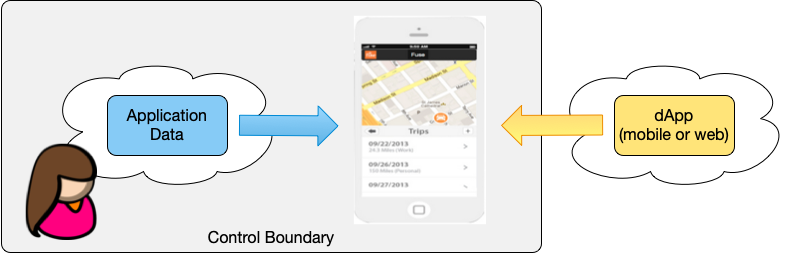
Let's start with the goal and work backwards from there. The goal of a dApp is to give people control over their apps and the data in them. This is not how the internet works today. As I wrote in The CompuServe of Things, the web and mobile apps are almost exclusively built on a model of intervening administrative authorities. As the operators of hosted apps and controllers of the identity systems upon which they're founded, the administrators can, for any reason whatsoever, revoke your rights to the application and any data it contains. Worse, most use your data for their own purposes, often in ways that are not in your best interest.
dApps, in contrast, give you control of the data and merely operate against it. Since they don't host the data, they can run locally, at the edge. Using smart contracts on a blockchain is one way to do this, but there are others, including peer-to-peer networks and InterPlanetary File System (IPFS). The point is, to achieve their goal, dApps need a way to store data that the application can reliably and securely reference, but that a person, rather than the app provider, controls. The core requirement for achieving control is that the data service be run by a provider who is not an intermediary and that the data model be substitutable. Control requires meaningful choice among a group of interoperable providers who are substitutable and compete for the trust of their customers.
I started writing about this idea back in 2012 and called it the Personal Cloud Application Architecture. At the time the idea of personal clouds had a lot of traction and a number of supporters. We built a demonstration app called Forever and later, I based the Fuse connected car application on this idea: let people control and use the data from their cars without an intermediary. Fuse's technical success showed the efficacy of the idea at scale. Fuse had a mobile app and felt like any other connected car application, but underneath the covers, the architecture gave control of the data to the car's owner. Dave Winer has also developed applications that use a substitutable backend storage based on Node.
Regular readers will wonder how I made it this far without mentioning picos. Forever and Fuse were both based on picos. Picos are designed to be self-hosted or hosted by providers who are substitutable. I've got a couple of projects tee'd up for two groups of students this winter that will further extend the suitability for picos as backends for dApps:
Support for Hosting Picos—the root pico in any instance of the pico engine is the ancestor of all picos in that engine and thus has ultimate control over them. To date, we've used the ability to stand up a new engine and control access to it as the means of providing control for the owner. This project will allow a hosting provider to easily stand up new instance of the engine and its root pico. For this to be viable, we'll use the support for peer DIDs my students built into the engine last year to give owners a peer DID connection to their root pico on their instance of the engine and thus give them control over the root pico and all its decedents.
Support for Solid Pods—at IIW this past October, we had a few sessions on how picos could be linked to Solid pods. This project will marry a pod to each pico that gets created and link their lifecycles. This, combined with their support for peer DIDs, makes the pico and its data movable between engines, supporting substitutability.
If I thought I had the bandwidth to support a third group, I'd have them work on building dApps and an App Store to run on top of this. Making that work has a few other fun technical challenges. We've done this before. As I said Forever and Fuse were both essentially dApps. Manifold, a re-creation of SquareTag is a large dApp for the Internet of Things that supports dApplets (is that a thing?) for each thing you store in it. What makes it a dApp is that the data is all in picos that could be hosted anywhere...at least in theory. Making that less theoretical is the next big step. Bruce Conrad has some ideas around that he calls the Pico Labs Affiliate Network.
I think the work of supporting dApps and personal control of our data is vitally important. As I wrote in 2014:
On the Net today we face a choice between freedom and captivity, independence and dependence. How we build the Internet of Things has far-reaching consequences for the humans who will use—or be used by—it. Will we push forward, connecting things using forests of silos that are reminiscent the online services of the 1980's, or will we learn the lessons of the Internet and build a true Internet of Things?
In a recent post, Clive Thompson speaks of the humble cassette tape as a medium that had a "a weirdly Internet-like vibe". Clive is focusing on how the cassette tape unlocked creativity, but in doing so he describes its properties in a way that is helpful to discussions about online relationships in general.
Clive doesn't speak about cassette tapes being decentralized. In fact, I chuckle as I write that down. Instead he's focused on some core properties. Two I found the most interesting were that cassette tapes allowed one-to-one exchange of music and that they were permissionless. He says:
If you wanted to record a cassette, you didn’t need anyone’s permission.
This was a quietly radical thing, back when cassette recorders first emerged. Many other forms of audio or moving-image media required a lot of capital infrastructure: If you wanted to broadcast a TV show, you needed a studio and broadcasting equipment; the same goes for a radio show or film, or producing and distributing an album. And your audience needed an entirely different set of technologies (televisions, radios, projectors, record players) to receive your messages.
The thing that struck me on reading this was the idea that symmetric technology democratizes speech. The web is based on assymetric technology: client-server. In theory everyone can have a server, but they don't for a lot of reasons including cost, difficulty, and friction. Consequently, the web is dominated by a few large players who act as intervening administrative authorities. They decide what happens online and who can participate. The web is not one-to-one and it is decidedly not permissionless.